> ## Documentation Index
> Fetch the complete documentation index at: https://help.4thewords.com/llms.txt
> Use this file to discover all available pages before exploring further.
# Account & Settings
> Set your timezone, update your profile, change credentials, and manage notifications.
## Overview
Your account settings control your display name, timezone, notifications, and login credentials. Getting your **timezone** right is critical: the game calculates your writing streak based on your local midnight, so a wrong timezone can cause streak breaks even when you've written.
> **Where to find it:** Left sidebar → **Account** → **Settings** (or **Profile**) [Open in 4TW ↗](https://app.4thewords.com/account/settings)
## Key Settings
### Timezone
**We set it automatically, but check this first.** Your timezone determines when your writing day starts and ends. If your timezone is wrong, days may reset at the wrong time, causing missed streak days even when you've written.
1. Go to **Account** → **Settings**.
2. Find the **Timezone** field.
3. Select your current timezone from the dropdown.
4. Save.
If you travel or move, update your timezone so streak calculations stay accurate.
### Display Name & Profile
Your display name is how other Dust Warriors see you across the game, in the community, in Lookbook, and on your public profile.
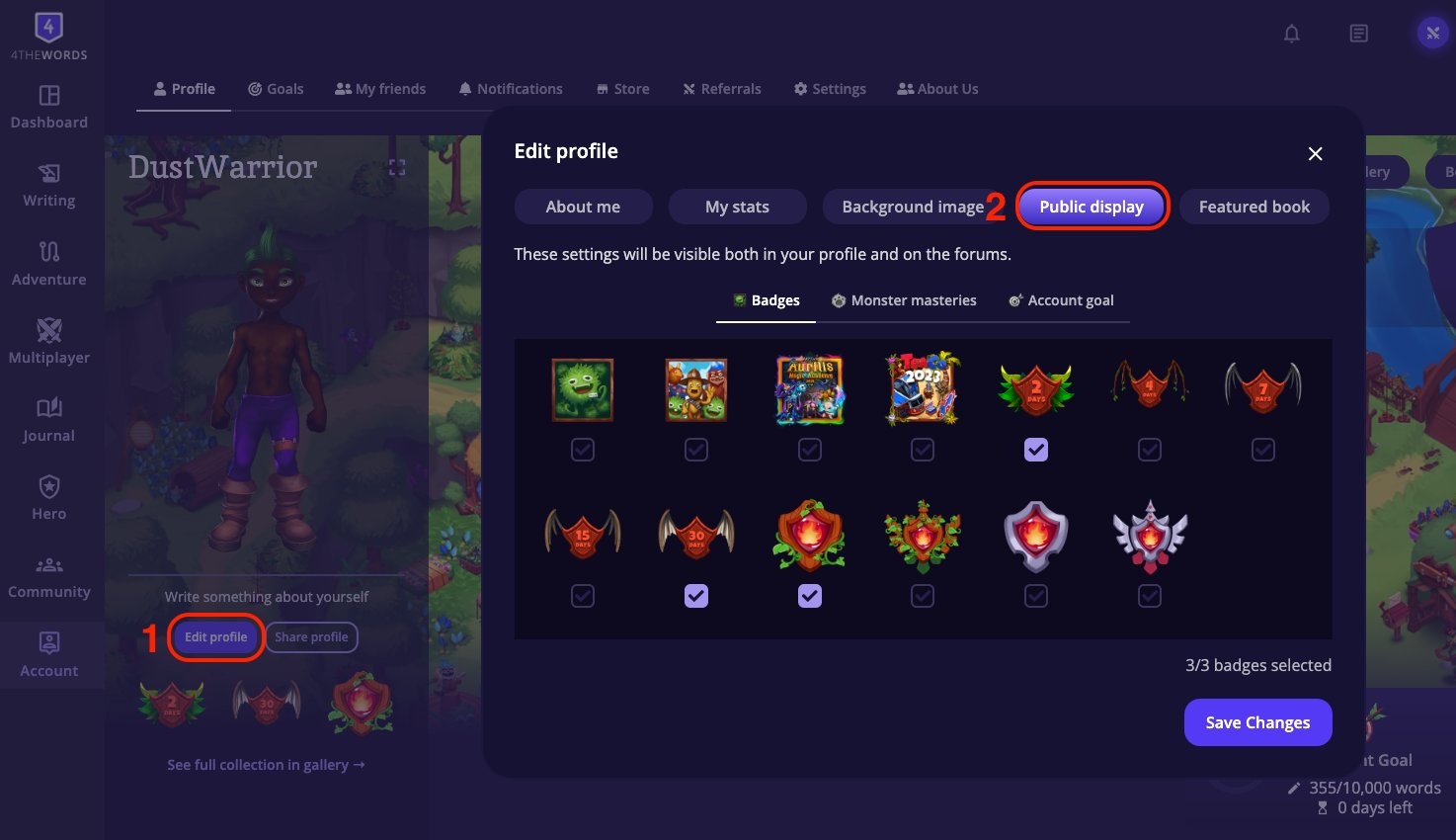 * **Display name.** Change it from **Account** → **Settings** → **Profile**.
* **Public profile.** Shows your featured character, mastery badges, and any public wardrobe looks.
* **Public Display.** Use **Edit Profile** → **Public Display** to choose which badges, masteries, and goals appear on your profile and in forums.
### Email & Password
Update your login credentials from **Account** → **Settings**:
* **Change email**: enter your new email address and confirm.
* **Change password**: enter your current password, then your new one.
## Frequently Asked Questions
Check it in your settings. Also, your writing streak resets at local midnight. If streak days seem to reset earlier or later than midnight in your location, your timezone is likely set wrong. Go to **Account** → **Settings** and update it.
Username change availability may vary. Check **Account** → **Settings** for the option. If it's not available, contact support.
Account → Settings → Delete account
Click **Save** after every change. Settings don't auto-save. If a change reverts after reload, try a hard refresh (Ctrl+Shift+R / Cmd+Shift+R) or a different browser.
**Your timezone affects your streak**
Keep your consecutive streak alive, earn Wings and Medals, and repair missed days with Stempos.
* **Display name.** Change it from **Account** → **Settings** → **Profile**.
* **Public profile.** Shows your featured character, mastery badges, and any public wardrobe looks.
* **Public Display.** Use **Edit Profile** → **Public Display** to choose which badges, masteries, and goals appear on your profile and in forums.
### Email & Password
Update your login credentials from **Account** → **Settings**:
* **Change email**: enter your new email address and confirm.
* **Change password**: enter your current password, then your new one.
## Frequently Asked Questions
Check it in your settings. Also, your writing streak resets at local midnight. If streak days seem to reset earlier or later than midnight in your location, your timezone is likely set wrong. Go to **Account** → **Settings** and update it.
Username change availability may vary. Check **Account** → **Settings** for the option. If it's not available, contact support.
Account → Settings → Delete account
Click **Save** after every change. Settings don't auto-save. If a change reverts after reload, try a hard refresh (Ctrl+Shift+R / Cmd+Shift+R) or a different browser.
**Your timezone affects your streak**
Keep your consecutive streak alive, earn Wings and Medals, and repair missed days with Stempos.