> ## Documentation Index
> Fetch the complete documentation index at: https://help.4thewords.com/llms.txt
> Use this file to discover all available pages before exploring further.
# Markets
> Browse area merchants, buy items with coins or crystals, and craft gear.
Markets are where you browse and buy items. Every adventure [area](/adventure/adventure-world/overview#unlocking-new-areas) has its own market with different stock. The further you explore, the more you'll find.
> **Where to find it:** Left sidebar → **Adventure** → **Markets** tab [Open in 4TW ↗](https://app.4thewords.com/adventure/markets)
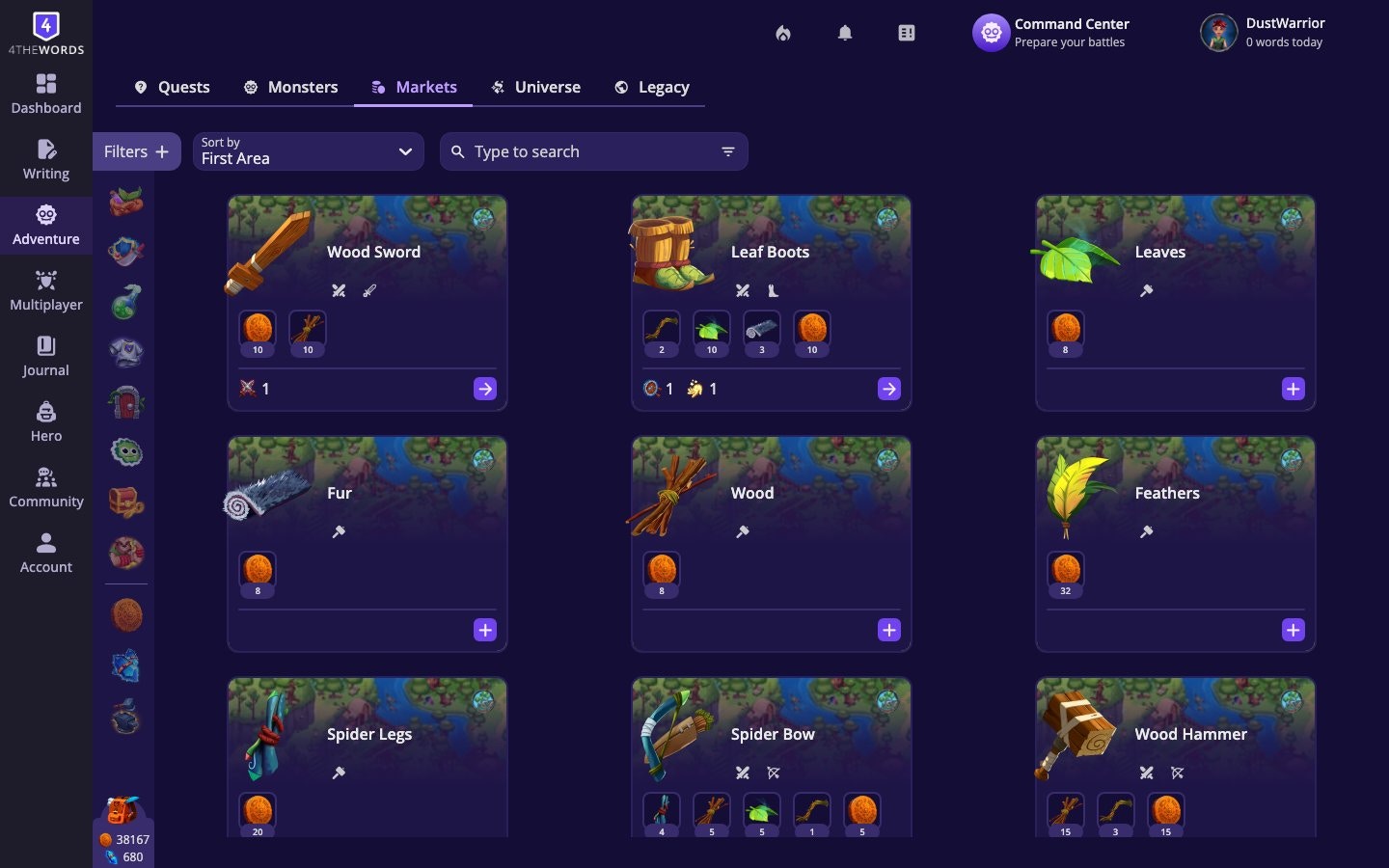 New areas bring new merchants with unique items. After unlocking an area, always check **Markets** to see what's newly available.
## Item Categories
Items are organized into 9 categories:
| Category | What it is |
| ------------------------------------------------------------------------------- | ------------------------------------------------------------------------------------------------------------ |
| [**Battle Items**](/character-and-gear/items-and-spells/battle-items-and-stats) | Weapons and gear that boost your Attack, Defense, or Luck stats |
| **Craft Items** | Materials used to make other items |
| **Consumable Items** | [Potions](/adventure/adventure-world/aurilis-magic-academy#potions): single-use items with temporary effects |
| **Wardrobe Items** | Clothing and accessories for your hero |
| **House Items** | Furniture and décor for your personal hideout Map |
| **Reactions** | Expression stickets and emotes you can use in the community |
| **Special** | Event and limited-availability items |
| **Chests & Keys** | Chests that unlock with matching keys |
| **Companions** | Pet companions that travel with your hero |
## Getting an Item
When you find an item you want, open its details panel. Most items offer one or more ways to acquire them:
* **Craft Item**: Combine the required materials to make it. You'll need all listed ingredients in your inventory.
* [**Buy with Coins**](/character-and-gear/resources-and-currency): Purchase it directly using your in-game Coins.
* [**Buy with Crystals**](/character-and-gear/resources-and-currency): Purchase it using premium Crystals. A link to the store appears if you need more.
Not all items offer all three methods. Some can only be crafted, others can only be purchased.
Crafting is usually cheaper than spending Coins or Crystals. If you have the materials, always check **Craft Item** first.
## Market Filters
New areas bring new merchants with unique items. After unlocking an area, always check **Markets** to see what's newly available.
## Item Categories
Items are organized into 9 categories:
| Category | What it is |
| ------------------------------------------------------------------------------- | ------------------------------------------------------------------------------------------------------------ |
| [**Battle Items**](/character-and-gear/items-and-spells/battle-items-and-stats) | Weapons and gear that boost your Attack, Defense, or Luck stats |
| **Craft Items** | Materials used to make other items |
| **Consumable Items** | [Potions](/adventure/adventure-world/aurilis-magic-academy#potions): single-use items with temporary effects |
| **Wardrobe Items** | Clothing and accessories for your hero |
| **House Items** | Furniture and décor for your personal hideout Map |
| **Reactions** | Expression stickets and emotes you can use in the community |
| **Special** | Event and limited-availability items |
| **Chests & Keys** | Chests that unlock with matching keys |
| **Companions** | Pet companions that travel with your hero |
## Getting an Item
When you find an item you want, open its details panel. Most items offer one or more ways to acquire them:
* **Craft Item**: Combine the required materials to make it. You'll need all listed ingredients in your inventory.
* [**Buy with Coins**](/character-and-gear/resources-and-currency): Purchase it directly using your in-game Coins.
* [**Buy with Crystals**](/character-and-gear/resources-and-currency): Purchase it using premium Crystals. A link to the store appears if you need more.
Not all items offer all three methods. Some can only be crafted, others can only be purchased.
Crafting is usually cheaper than spending Coins or Crystals. If you have the materials, always check **Craft Item** first.
## Market Filters
 The market has smart filters to help you find what you need fast:
* **Can afford to craft**: Shows only items you have enough materials to craft right now
* **Need for Quests**: Shows items required by your active quests
* **Favorites**: Show only your starred market items
* **Category**: Filter by any of the 9 item types
* **Sort**: Organize by Id, Alphabetically, Recently Added, or by combat stat (High Attack / High Defense / High Luck)
Star any market item with the **Favorites** icon to pin it for quick access later — handy for bookmarking items you're saving up for or plan to craft.
## Frequently Asked Questions
Items come from three main sources. Buying or crafting them at Markets (**Adventure** → **Markets**), earning them as quest rewards, and looting them from defeated monsters. Open any item's details panel to see all the ways to obtain it.
No. Equipped battle items stay in your loadout and don't get consumed. Only **Consumable Items** are single-use. Everything else persists across fights until you choose to change it.
Reactions are stickers or emotes you can collect and use in community spaces. The forum, threads, and other places where Dust Warriors interact. When you send a reaction in the forum it taken from your inventory and added to the recipient's inventory.
Either you don't have enough coins/crystals, or you're missing crafting materials. Click the item to see its full cost breakdown. Some items are only available during events or after meeting conditions.
Items are area-specific, not every market carries every item. You may need to unlock that area through the Main Storyline first.
You're missing one or more required materials. Open the item details and review the requirements. Every ingredient must be in your inventory in sufficient quantity. Use the **Can afford to craft** filter in Markets to see which items you're already able to make.
**Earn it, spend it, equip it**
How to earn Coins, Crystals, and Stempos, and what to spend them on.
Quests reward items and currency you can use at Markets.
Where your purchased items end up, and how to equip them.
The market has smart filters to help you find what you need fast:
* **Can afford to craft**: Shows only items you have enough materials to craft right now
* **Need for Quests**: Shows items required by your active quests
* **Favorites**: Show only your starred market items
* **Category**: Filter by any of the 9 item types
* **Sort**: Organize by Id, Alphabetically, Recently Added, or by combat stat (High Attack / High Defense / High Luck)
Star any market item with the **Favorites** icon to pin it for quick access later — handy for bookmarking items you're saving up for or plan to craft.
## Frequently Asked Questions
Items come from three main sources. Buying or crafting them at Markets (**Adventure** → **Markets**), earning them as quest rewards, and looting them from defeated monsters. Open any item's details panel to see all the ways to obtain it.
No. Equipped battle items stay in your loadout and don't get consumed. Only **Consumable Items** are single-use. Everything else persists across fights until you choose to change it.
Reactions are stickers or emotes you can collect and use in community spaces. The forum, threads, and other places where Dust Warriors interact. When you send a reaction in the forum it taken from your inventory and added to the recipient's inventory.
Either you don't have enough coins/crystals, or you're missing crafting materials. Click the item to see its full cost breakdown. Some items are only available during events or after meeting conditions.
Items are area-specific, not every market carries every item. You may need to unlock that area through the Main Storyline first.
You're missing one or more required materials. Open the item details and review the requirements. Every ingredient must be in your inventory in sufficient quantity. Use the **Can afford to craft** filter in Markets to see which items you're already able to make.
**Earn it, spend it, equip it**
How to earn Coins, Crystals, and Stempos, and what to spend them on.
Quests reward items and currency you can use at Markets.
Where your purchased items end up, and how to equip them.