> ## Documentation Index
> Fetch the complete documentation index at: https://help.4thewords.com/llms.txt
> Use this file to discover all available pages before exploring further.
# Questbook
> Manage your active quests, track objectives, deliver for rewards, and handle timed and repeatable quests.
Your Questbook is where your active quests live — your adventure to-do list.
> **Where to find it:** Left sidebar → **Journal** → **Questbook** [Open in 4TW ↗](https://app.4thewords.com/journal/questbook)
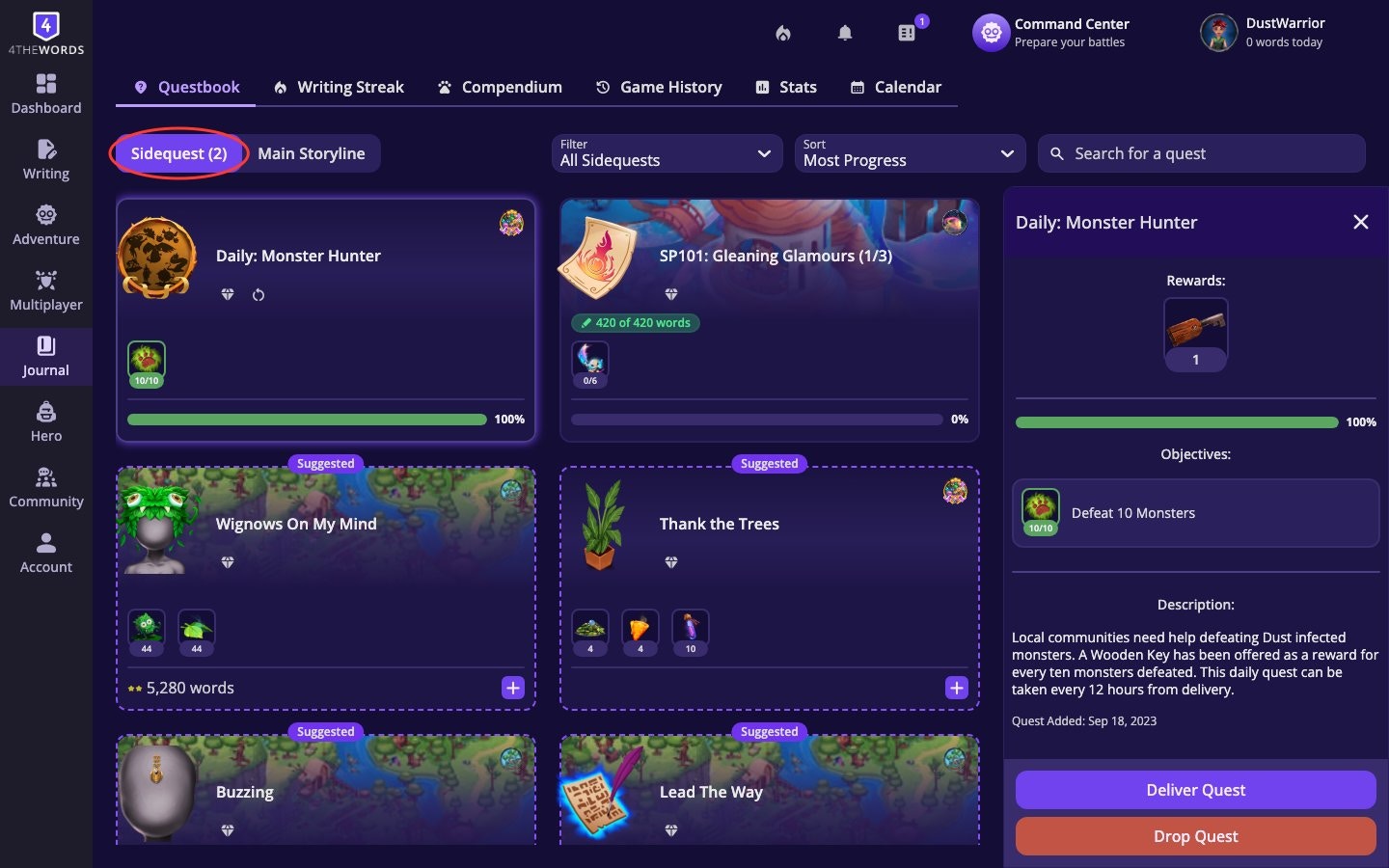 Your questbook has a **slot limit** based on your [plan](/account/plans-and-pricing):
| Plan | Max Active Quests |
| -------- | ----------------- |
| Free | 8 |
| Member | 30 |
| Pro | 50 |
| Lifetime | 50 |
When your questbook is full, you'll see a **Questbook Full** indicator and you won't be able to accept new quests until you free up a slot. Deliver completed quests or drop ones you no longer want to make room.
* **Search.** Type any keyword to filter your active quests. Matches across quest names, objectives, rewards, and areas. Search "Wignow" to find every quest involving that monster, or "Leaves" to spot quests that drop a specific item.
* **Filter.** Narrow by reward type, objective type, favorites, repeatable, or timed quests.
* **Sort.** Reorder by Recently Added, Oldest Added, Most Progress, or Least Progress.
* **Card size.** Switch between compact and full-size quest cards.
**Looking for how to find new quests?** The Main Storyline, Quest Markets, sidequest browsing, and quest filtering are all covered in the [Quests](/adventure/quests) guide.
## Quest Objectives and Delivering
You are actively working on all of the objectives for the Quests in your Questbook. Make sure to add a Quest to your Questbook before fighting monsters.
Completing a quest's objectives doesn't automatically give you the rewards. You have to deliver the quest manually.
1. **Tap any quest card** to open its details panel. This shows every objective with a progress bar.
2. **Check your progress.** Objectives can require a mix of things:
* Writing a set number of words
* Defeating specific monsters
* Collecting or having certain items
* Completing a writing streak
3. **Complete every objective.** All objectives must reach 100% before you can deliver. If the **Deliver Quest** button isn't active, at least one objective isn't done yet. Check each one carefully.
4. **Tap Deliver Quest.** Once all objectives are complete, the button activates. Tap it to claim your rewards and move the quest to your Quest History.
Completed quests still occupy questbook slots until you deliver them. Tap **Deliver Quest** the moment all objectives hit 100% to free up space.
## Timed Quests
Some quests come with a countdown clock. You need to complete them before the timer runs out.
Your questbook has a **slot limit** based on your [plan](/account/plans-and-pricing):
| Plan | Max Active Quests |
| -------- | ----------------- |
| Free | 8 |
| Member | 30 |
| Pro | 50 |
| Lifetime | 50 |
When your questbook is full, you'll see a **Questbook Full** indicator and you won't be able to accept new quests until you free up a slot. Deliver completed quests or drop ones you no longer want to make room.
* **Search.** Type any keyword to filter your active quests. Matches across quest names, objectives, rewards, and areas. Search "Wignow" to find every quest involving that monster, or "Leaves" to spot quests that drop a specific item.
* **Filter.** Narrow by reward type, objective type, favorites, repeatable, or timed quests.
* **Sort.** Reorder by Recently Added, Oldest Added, Most Progress, or Least Progress.
* **Card size.** Switch between compact and full-size quest cards.
**Looking for how to find new quests?** The Main Storyline, Quest Markets, sidequest browsing, and quest filtering are all covered in the [Quests](/adventure/quests) guide.
## Quest Objectives and Delivering
You are actively working on all of the objectives for the Quests in your Questbook. Make sure to add a Quest to your Questbook before fighting monsters.
Completing a quest's objectives doesn't automatically give you the rewards. You have to deliver the quest manually.
1. **Tap any quest card** to open its details panel. This shows every objective with a progress bar.
2. **Check your progress.** Objectives can require a mix of things:
* Writing a set number of words
* Defeating specific monsters
* Collecting or having certain items
* Completing a writing streak
3. **Complete every objective.** All objectives must reach 100% before you can deliver. If the **Deliver Quest** button isn't active, at least one objective isn't done yet. Check each one carefully.
4. **Tap Deliver Quest.** Once all objectives are complete, the button activates. Tap it to claim your rewards and move the quest to your Quest History.
Completed quests still occupy questbook slots until you deliver them. Tap **Deliver Quest** the moment all objectives hit 100% to free up space.
## Timed Quests
Some quests come with a countdown clock. You need to complete them before the timer runs out.
 1. **Spot them by the timer pill.** Timed quests show a countdown on their card. The clock starts the moment you accept them.
2. **Work on them first.** Because the timer is live, make progress on timed quests before your other quests.
3. **Add monsters right away.** If a timed quest involves defeating monsters, use **Accept + add Monsters** when you pick it up, or tap **Add Monsters** from the quest details, so you don't lose time.
4. **What happens if time runs out?** The quest is automatically marked as lost and moves to your Quest History. Your progress is not saved. You can also manually **Drop Quest** before the timer expires if you decide it's not worth the pressure and can usually pick it up again later.
## Repeatable Quests
Repeatable quests can be picked up and completed more than once. They reset after delivery.
* They show a reload icon on the quest card.
* A tooltip shows how many times you've completed them: "Repeatable: completed X time(s)."
* **Hover the reload icon** to see the quest's cooldown: how long until you can pick it up again.
* After delivering, wait for the cooldown to end and head back to the Quest Market to pick them up again. Most repeatable quests have a short cooldown of 1 or 2 days.
Repeatable quests are great for farming specific items or earning steady rewards on a schedule you control.
## Event Quests
[Special Events](/adventure/special-events) introduce limited-time quests with exclusive rewards. Look for them in your area's Quest Market while an event is active.
* **Don't wait.** When the event ends, event quests disappear from Quest Markets.
* If you already accepted an event quest before the event ended, it stays in your Questbook and you can still complete it.
## Dropping a Quest
Changed your mind about a quest? You can drop it to free up a questbook slot.
1. Tap the quest card to open its details.
2. Tap **Drop Quest**.
3. Confirm the prompt. "Are you sure you want to drop \[quest name]? Your current progress for this quest will be lost."
**Dropped quests cannot be recovered.** All progress is permanently lost. Main Storyline quests cannot be dropped at all. If you dropped a sidequest by mistake, pick it up again from the Quest Market and start again.
## Frequently Asked Questions
Your questbook is full. Deliver any completed quests, or drop quests you no longer want, to free up slots. Free accounts can carry 8 quests at a time; Member accounts can carry 30; Pro and Lifetime accounts can carry 50.
Not all objectives are at 100% yet. Open the quest details and check each one. Every objective must be complete before delivery unlocks. Even one missing item blocks it.
It's automatically marked as lost and moved to your Quest History. Your progress is not saved. Work on timed quests as soon as you accept them to avoid this.
Repeatable quests can be picked up again from the Quest Market after delivery. Most common sidequests can only be completed once.
Yes. Except for Special Event quests, all non-completed quest will reappear in a Quest Market, you can accept it again and start from zero.
The event has ended. Event quests leave Quest Markets when their event closes. Watch for event announcements in the **Community** section so you don't miss the window next time.
**Find quests and expand your slots**
Find quests, follow the Main Storyline, and unlock new areas.
Compare plans including Questbook slot limits.
1. **Spot them by the timer pill.** Timed quests show a countdown on their card. The clock starts the moment you accept them.
2. **Work on them first.** Because the timer is live, make progress on timed quests before your other quests.
3. **Add monsters right away.** If a timed quest involves defeating monsters, use **Accept + add Monsters** when you pick it up, or tap **Add Monsters** from the quest details, so you don't lose time.
4. **What happens if time runs out?** The quest is automatically marked as lost and moves to your Quest History. Your progress is not saved. You can also manually **Drop Quest** before the timer expires if you decide it's not worth the pressure and can usually pick it up again later.
## Repeatable Quests
Repeatable quests can be picked up and completed more than once. They reset after delivery.
* They show a reload icon on the quest card.
* A tooltip shows how many times you've completed them: "Repeatable: completed X time(s)."
* **Hover the reload icon** to see the quest's cooldown: how long until you can pick it up again.
* After delivering, wait for the cooldown to end and head back to the Quest Market to pick them up again. Most repeatable quests have a short cooldown of 1 or 2 days.
Repeatable quests are great for farming specific items or earning steady rewards on a schedule you control.
## Event Quests
[Special Events](/adventure/special-events) introduce limited-time quests with exclusive rewards. Look for them in your area's Quest Market while an event is active.
* **Don't wait.** When the event ends, event quests disappear from Quest Markets.
* If you already accepted an event quest before the event ended, it stays in your Questbook and you can still complete it.
## Dropping a Quest
Changed your mind about a quest? You can drop it to free up a questbook slot.
1. Tap the quest card to open its details.
2. Tap **Drop Quest**.
3. Confirm the prompt. "Are you sure you want to drop \[quest name]? Your current progress for this quest will be lost."
**Dropped quests cannot be recovered.** All progress is permanently lost. Main Storyline quests cannot be dropped at all. If you dropped a sidequest by mistake, pick it up again from the Quest Market and start again.
## Frequently Asked Questions
Your questbook is full. Deliver any completed quests, or drop quests you no longer want, to free up slots. Free accounts can carry 8 quests at a time; Member accounts can carry 30; Pro and Lifetime accounts can carry 50.
Not all objectives are at 100% yet. Open the quest details and check each one. Every objective must be complete before delivery unlocks. Even one missing item blocks it.
It's automatically marked as lost and moved to your Quest History. Your progress is not saved. Work on timed quests as soon as you accept them to avoid this.
Repeatable quests can be picked up again from the Quest Market after delivery. Most common sidequests can only be completed once.
Yes. Except for Special Event quests, all non-completed quest will reappear in a Quest Market, you can accept it again and start from zero.
The event has ended. Event quests leave Quest Markets when their event closes. Watch for event announcements in the **Community** section so you don't miss the window next time.
**Find quests and expand your slots**
Find quests, follow the Main Storyline, and unlock new areas.
Compare plans including Questbook slot limits.