> ## Documentation Index
> Fetch the complete documentation index at: https://help.4thewords.com/llms.txt
> Use this file to discover all available pages before exploring further.

# Chrome Extension

> Count words anywhere on the web and sync them straight into your battles, streaks, and quests.

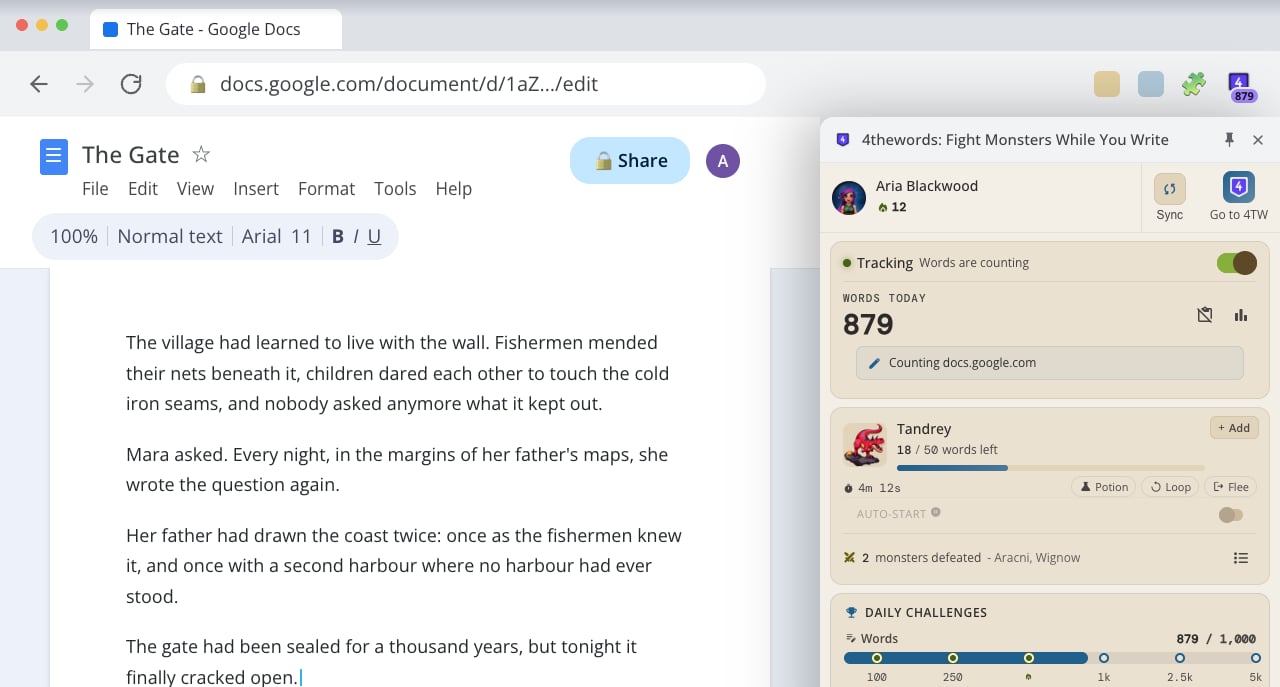
The 4thewords Chrome Extension counts your words where you write and turns them into battle damage, streak progress, and daily challenge credit. Writing sites like Google Docs, Notion, and Substack count from the moment you install. Adding any other site, even your email, takes one click. No need to paste your writing back into 4thewords.

<Frame>
  <img src="https://mintcdn.com/4thewords/ph8FUo-Y0GWNtdl1/images/extension-sidepanel-google-docs.png?fit=max&auto=format&n=ph8FUo-Y0GWNtdl1&q=85&s=e73d1eeca4ea178b12b4defcda49dbdd" alt="The 4thewords side panel open beside a Google Doc, showing tracking switched on, 879 words counted today from docs.google.com, an active battle against Tandrey with 18 of 50 words left, and the Daily Challenges progress bar" width="1280" height="687" data-path="images/extension-sidepanel-google-docs.png" />
</Frame>

<Info>
  Built for Chrome 114 or later. Other Chromium browsers (Edge, Brave, Arc) can install it and it generally works, but Chrome is the only browser we test and support.
</Info>

## See it in action

A two-minute walkthrough of the extension end to end: installing it, fighting your first battle, counting words anywhere, choosing your sites, connecting an account, co-op battles, where your words go, and the side panel's themes and streak.

<iframe width="100%" height="400" src="https://www.youtube.com/embed/_x-pudXD2v4" title="The whole 4thewords extension in under two minutes" frameBorder="0" allow="accelerometer; autoplay; clipboard-write; encrypted-media; gyroscope; picture-in-picture" allowFullScreen />

## In this section

<CardGroup cols={3}>
  <Card icon="download" href="/tools/chrome-extension/installing-and-connecting" title="Installing & Connecting">
    Add the extension to Chrome and link it to your 4thewords account.
  </Card>

  <Card icon="pen" href="/tools/chrome-extension/word-counting-and-my-sites" title="Word Counting & My Sites">
    Choose which sites count, and see your writing broken down by site and session.
  </Card>

  <Card icon="sword" href="/tools/chrome-extension/battles-streaks-and-quests" title="Battles, Streaks & Quests Sync">
    How words typed anywhere flow into your active battle, streak, and Questbook.
  </Card>
</CardGroup>

<CardGroup cols={2}>
  <Card icon="sliders" href="/tools/chrome-extension/side-panel-and-settings" title="Side Panel, Themes & Settings">
    Popup vs. side panel, color themes, what the toolbar icon is telling you, and every setting explained.
  </Card>

  <Card icon="shield-halved" href="/tools/chrome-extension/permissions-and-privacy" title="Permissions & Privacy">
    What the extension can access, why, and what it never reads.
  </Card>
</CardGroup>
