> ## Documentation Index
> Fetch the complete documentation index at: https://help.4thewords.com/llms.txt
> Use this file to discover all available pages before exploring further.
# Battle List
> Manage your queue of monsters, auto-start chains, and loop battles.
Like a music playlist, but for writing battles. Organize battles into your preferred order so you can write and fight uninterrupted.
> **Where to find it:** anywhere on the site → **Command Center** → the **Monsters Panel**
Your **Battle List** is your queue of monsters to fight. Before a solo battle starts, you add monsters here, then write to defeat them one by one.
**Adding monsters:**
* Click the **+** button on any monster card to add it to your Battle List.
* The list holds from **8-30 monsters** at a time (depending on your subscription tier).
* **Red × on the card?** Either your list is full or the monster has requirements you haven't met. Requirements are usually inventory items that get consumed when you add the monster. Remove it before battling and the items come back.
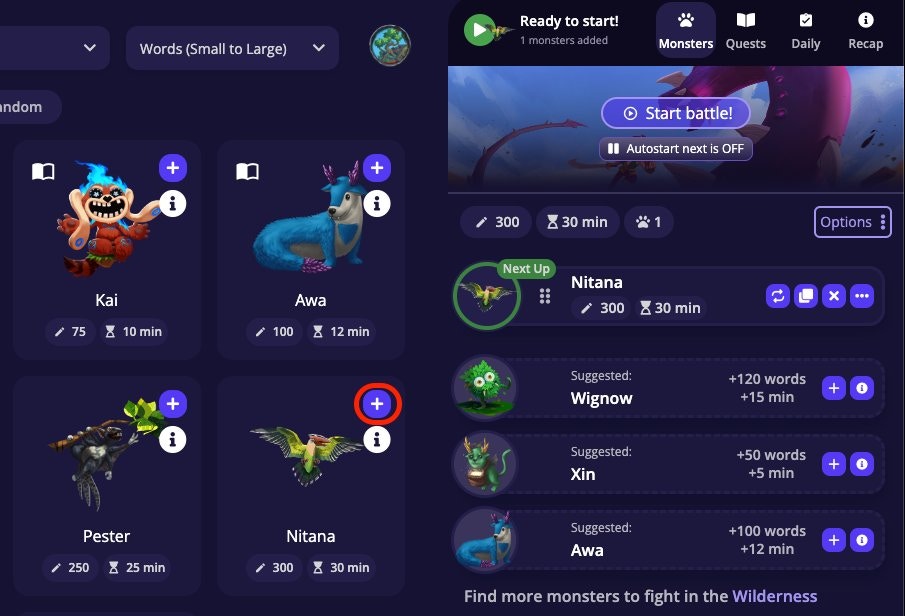 * Drag the grip icon on any row to reorder your list. Use the **Options** button to sort by size or time.
 **Auto-Start Next:**
Toggle **Auto-Start Next** to chain battles automatically. When it's on and you win a battle, the next one in your list starts immediately, no clicking required.
**Auto-Start Next:**
Toggle **Auto-Start Next** to chain battles automatically. When it's on and you win a battle, the next one in your list starts immediately, no clicking required.
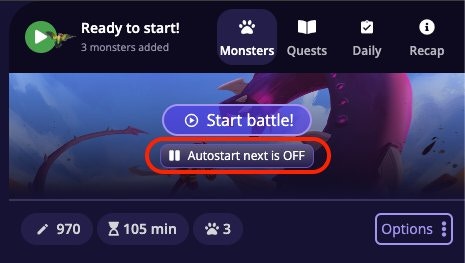 * **On**: battles chain one after another as you write.
* **Off**: you click **Start** manually for each battle. A way to pause the next battle and take a break.
If you *lose* a battle, Auto-Start Next turns off automatically so you don't burn through your entire list while you're away.
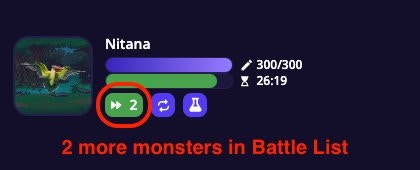
During an active battle, the HUD shows your auto-start status and how many more monsters are queued after the current one:
* **On**: battles chain one after another as you write.
* **Off**: you click **Start** manually for each battle. A way to pause the next battle and take a break.
If you *lose* a battle, Auto-Start Next turns off automatically so you don't burn through your entire list while you're away.
During an active battle, the HUD shows your auto-start status and how many more monsters are queued after the current one:
 **Loop:**
The **Loop** feature repeats a single monster indefinitely. Great for fighting the same monster over and over again.
When Loop is enabled for a monster and you defeat it, a new battle against that same monster begins automatically. Toggle Loop off when you're ready to move on.
**Loop:**
The **Loop** feature repeats a single monster indefinitely. Great for fighting the same monster over and over again.
When Loop is enabled for a monster and you defeat it, a new battle against that same monster begins automatically. Toggle Loop off when you're ready to move on.
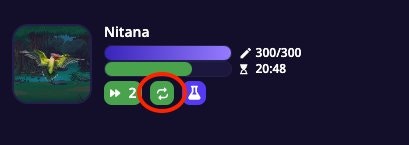 Loop overrides your Battle List order, as long as Loop is on, you'll keep fighting the same monster regardless of what else is queued.
## Frequently Asked Questions
You've hit your daily battle limit. This limit resets each day. Upgrading your subscription plan increases how many battles you can run per day.
Either your Battle List is full (check the count at the top of the list) or the monster has unmet requirements. Requirements are usually items from your inventory that get consumed when you add the monster. Click the "i" icon on a monster to see their details and spot the requirement.
**Auto-Start Next** plays through your Battle List in order. When you beat one monster, the next in the queue starts. **Loop** repeats the same monster indefinitely, ignoring everything else in the list. Turn Loop off when you're ready to move on.
If the monster required items from your inventory to add, those items are returned when you remove the monster before battling it. Check your inventory. They should be back.
**Build your session**
How solo battles work. Damage, timers, Attack stat, and rewards.
Browse and filter 800+ monsters to fill your queue.
Battles you win count toward your daily streak.
Loop overrides your Battle List order, as long as Loop is on, you'll keep fighting the same monster regardless of what else is queued.
## Frequently Asked Questions
You've hit your daily battle limit. This limit resets each day. Upgrading your subscription plan increases how many battles you can run per day.
Either your Battle List is full (check the count at the top of the list) or the monster has unmet requirements. Requirements are usually items from your inventory that get consumed when you add the monster. Click the "i" icon on a monster to see their details and spot the requirement.
**Auto-Start Next** plays through your Battle List in order. When you beat one monster, the next in the queue starts. **Loop** repeats the same monster indefinitely, ignoring everything else in the list. Turn Loop off when you're ready to move on.
If the monster required items from your inventory to add, those items are returned when you remove the monster before battling it. Check your inventory. They should be back.
**Build your session**
How solo battles work. Damage, timers, Attack stat, and rewards.
Browse and filter 800+ monsters to fill your queue.
Battles you win count toward your daily streak.