> ## Documentation Index
> Fetch the complete documentation index at: https://help.4thewords.com/llms.txt
> Use this file to discover all available pages before exploring further.
# Co-Op Battles
> Team up with 2–8 Dust Warriors to defeat a shared monster. Everyone writes in their own file.
Co-op battles let 2–8 Dust Warriors fight a single monster together. The monster is stronger than what you'd face alone, but you share the work. Each player writes in their own file and your **word counts are combined** to drain the shared monster's health.
> **Where to find it:** Left sidebar → **Multiplayer** → **Lobby Rooms** tab [Open in 4TW ↗](https://app.4thewords.com/multiplayer)
## How Co-Op Differs from Solo
If you're coming from solo battles, here's what changes:
| | Solo | Co-Op |
| ---------- | ------------------ | -------------------------------- |
| Monster HP | Standard | Scaled by team size + difficulty |
| Writing | Your file | Your file |
| Potions | Allowed | **Not available** |
| Copy/Paste | Always allowed | Depends on difficulty |
| Completion | Individual | Team shares the victory |
| Rewards | Based on your Luck | Based on your Luck |
If you have a solo battle running it'll automatically be paused if you join a co-op room. After the co-op ends, unfreeze it and pick up right where you left off.
## The Co-Op Lobby
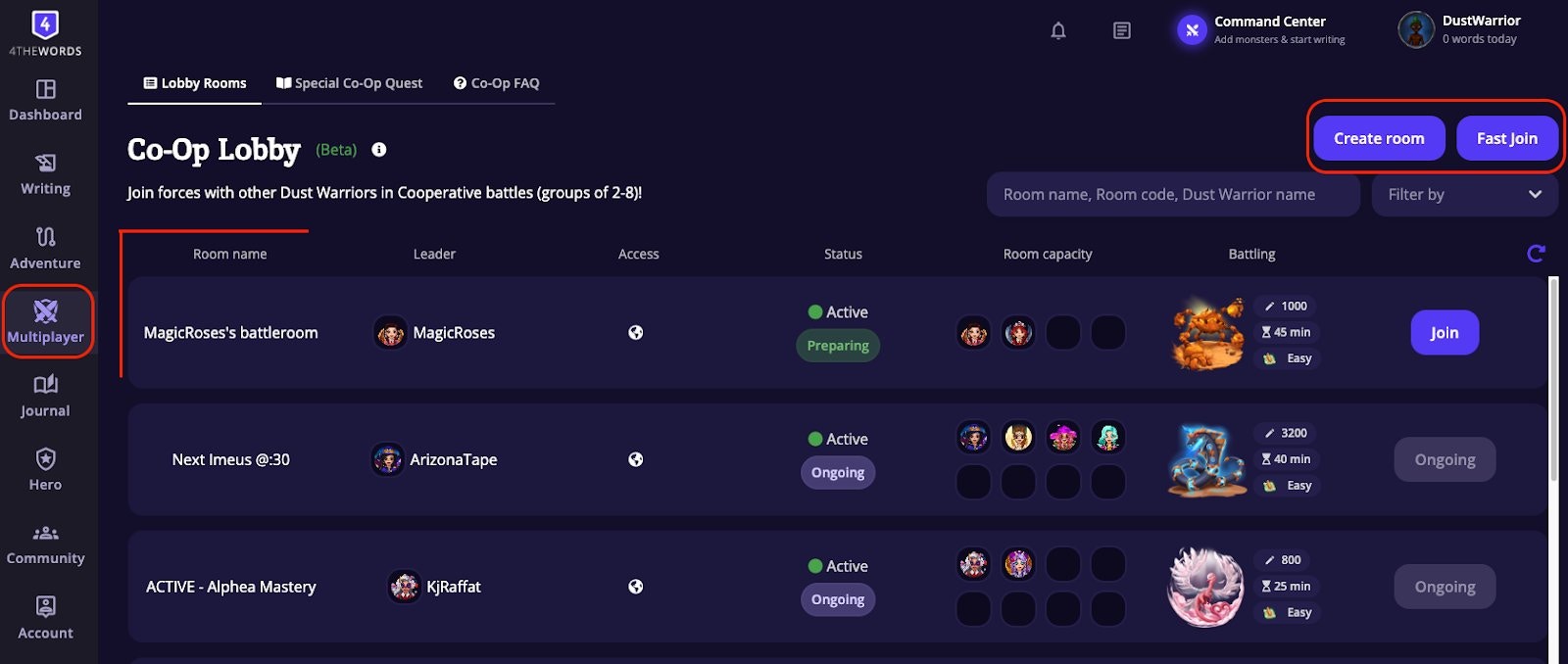 Open **Multiplayer** in the left sidebar to reach the **Lobby Rooms** tab. This is where all active co-op rooms are listed. Each room shows its name, leader, status (Preparing or Ongoing), player capacity, and the monster being fought.
You have three ways to get into a battle:
* **Fast Join**: drops you into the most recently created public room that still has space. Quickest way in.
* **Browse the lobby**: find a specific room by name, room code, or the leader's username.
* **Create Room**: choose your own monster and settings, set it to Public so others can join, or invite friends with a room code.
## Joining or Creating a Room
### Room setup (for leaders)
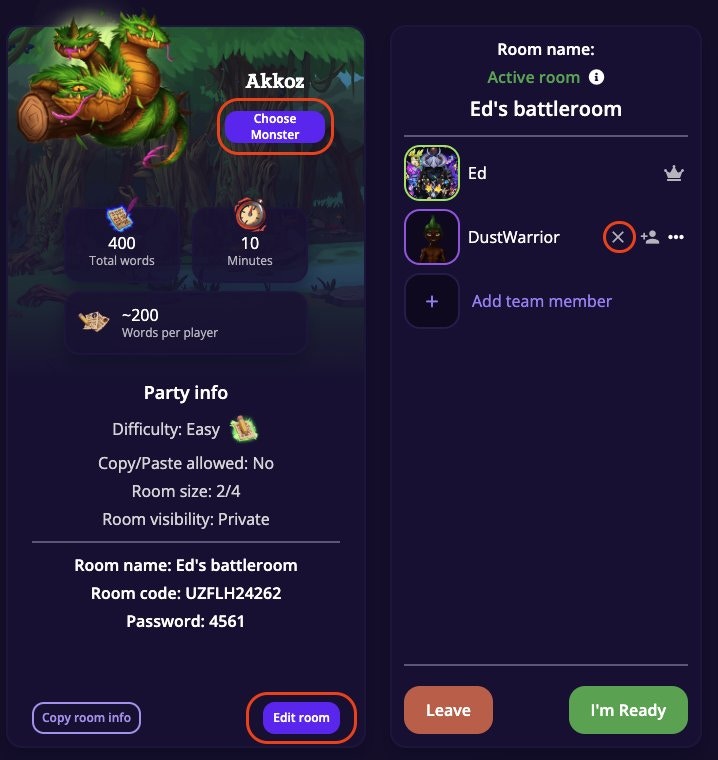
When you create a room, you pick the monster (via **Choose Monster**) and pick the settings.
The room panel shows Party info (difficulty, copy/paste rules, room size, visibility), the room code for sharing, and an **Edit room** button to adjust settings before the battle starts.
Open **Multiplayer** in the left sidebar to reach the **Lobby Rooms** tab. This is where all active co-op rooms are listed. Each room shows its name, leader, status (Preparing or Ongoing), player capacity, and the monster being fought.
You have three ways to get into a battle:
* **Fast Join**: drops you into the most recently created public room that still has space. Quickest way in.
* **Browse the lobby**: find a specific room by name, room code, or the leader's username.
* **Create Room**: choose your own monster and settings, set it to Public so others can join, or invite friends with a room code.
## Joining or Creating a Room
### Room setup (for leaders)
When you create a room, you pick the monster (via **Choose Monster**) and pick the settings.
The room panel shows Party info (difficulty, copy/paste rules, room size, visibility), the room code for sharing, and an **Edit room** button to adjust settings before the battle starts.
 ### Room codes & visibility
Every battle room has a unique **room code** (e.g. `SMQGP05641`). Share this code with friends so they can join directly.
* **Public rooms** are open to all.
* **Private rooms** are only accessible by room code. Use these when you want to control who's in the battle.
Co-op rooms go inactive after 60 minutes with no activity (messages, ready status changes, or player joins) and are deleted after 24 hours.
### Difficulty levels
### Room codes & visibility
Every battle room has a unique **room code** (e.g. `SMQGP05641`). Share this code with friends so they can join directly.
* **Public rooms** are open to all.
* **Private rooms** are only accessible by room code. Use these when you want to control who's in the battle.
Co-op rooms go inactive after 60 minutes with no activity (messages, ready status changes, or player joins) and are deleted after 24 hours.
### Difficulty levels
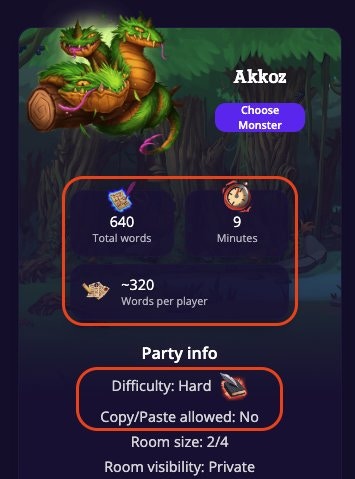 The room leader sets difficulty via the **Edit Room** button. Higher difficulty means more monster health and a tighter timer, but better rewards. The room panel shows scaled total words, time limit, and approximate words per player.
| Difficulty | Monster Health | Time Limit | Rewards | Copy/Paste |
| ---------- | -------------- | ---------- | ------- | ----------- |
| Easy | Base | Base | Base | Allowed |
| Medium | ×1.4 | Base | ×1.4 | Not allowed |
| Hard | ×1.6 | ×0.9 | ×1.6 | Not allowed |
| Extreme | ×1.8 | ×0.8 | ×1.8 | Not allowed |
Co-Op monsters grow in size to match the number of teammates you bring to battle. A co-op monster’s word count will be multiplied by the number of teammates (a 500 word monster is 1,000 words for a team of 2 and 2,500 words for a team of 5). The challenge grows with the team, but so does the shared effort as one team member can write more to help a struggling team mate.
The monsters time limit will remain the same (against a 30 minute monster you’ll have 30 minutes regardless of the number of teammates).
If a player drops out mid-battle, the monster's HP doesn't scale back down. The remaining players still need to drain the same health pool. Keep this in mind on harder difficulties.
### Getting ready
Each player clicks **I'm Ready** when they're set to go. The battle doesn't start until everyone is ready. The leader can wait or remove someone who's taking too long.
## During the Battle
Once every player clicks Ready, the battle starts automatically and your timer begins. Open any document and write. Your words go toward damaging the shared monster. You can see everyone's individual word count in real time.
The room leader sets difficulty via the **Edit Room** button. Higher difficulty means more monster health and a tighter timer, but better rewards. The room panel shows scaled total words, time limit, and approximate words per player.
| Difficulty | Monster Health | Time Limit | Rewards | Copy/Paste |
| ---------- | -------------- | ---------- | ------- | ----------- |
| Easy | Base | Base | Base | Allowed |
| Medium | ×1.4 | Base | ×1.4 | Not allowed |
| Hard | ×1.6 | ×0.9 | ×1.6 | Not allowed |
| Extreme | ×1.8 | ×0.8 | ×1.8 | Not allowed |
Co-Op monsters grow in size to match the number of teammates you bring to battle. A co-op monster’s word count will be multiplied by the number of teammates (a 500 word monster is 1,000 words for a team of 2 and 2,500 words for a team of 5). The challenge grows with the team, but so does the shared effort as one team member can write more to help a struggling team mate.
The monsters time limit will remain the same (against a 30 minute monster you’ll have 30 minutes regardless of the number of teammates).
If a player drops out mid-battle, the monster's HP doesn't scale back down. The remaining players still need to drain the same health pool. Keep this in mind on harder difficulties.
### Getting ready
Each player clicks **I'm Ready** when they're set to go. The battle doesn't start until everyone is ready. The leader can wait or remove someone who's taking too long.
## During the Battle
Once every player clicks Ready, the battle starts automatically and your timer begins. Open any document and write. Your words go toward damaging the shared monster. You can see everyone's individual word count in real time.
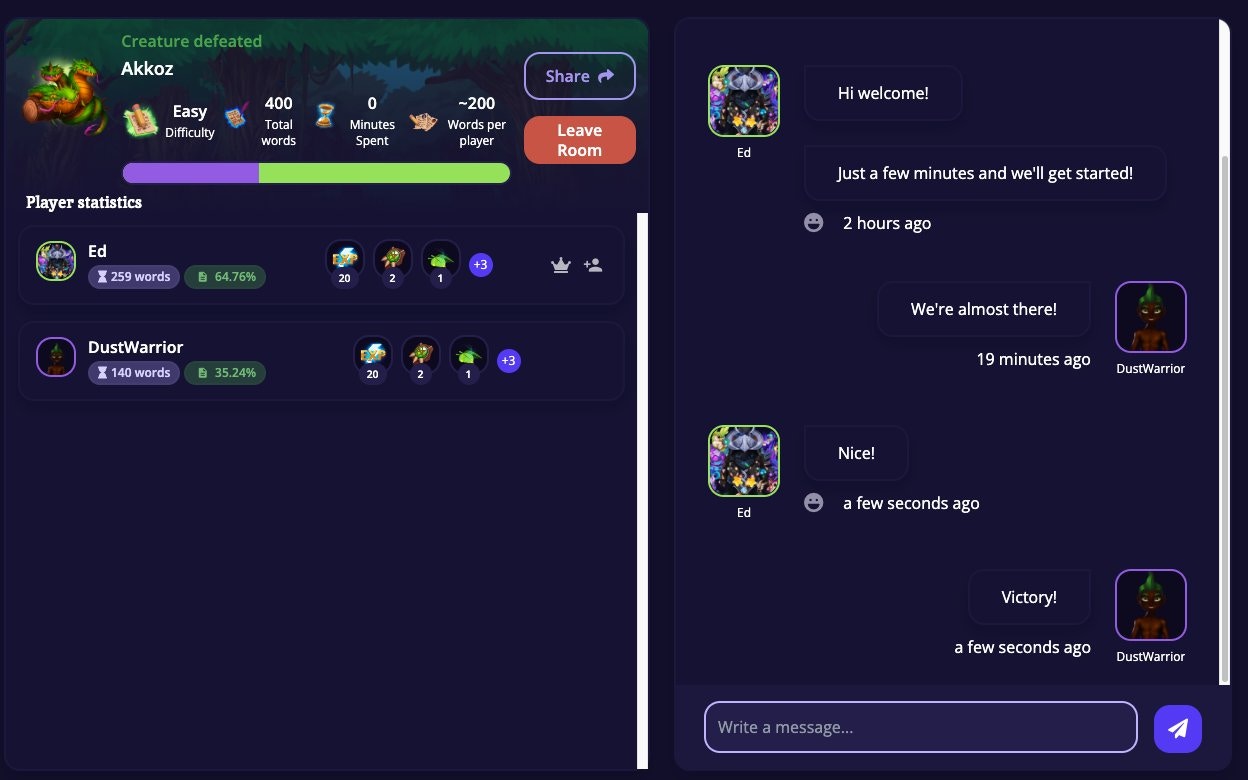
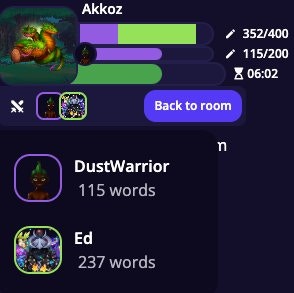 The battle ends when the monster's health hits zero (victory!) or the timer runs out (defeat). After a win, you'll see each player's word count, contribution percentage, and individual loot drops. The room chat lets you celebrate together.
 ## Rewards & Mastery
Everyone gets their own individual reward roll based on their [**Luck stat**](/character-and-gear/items-and-spells/battle-items-and-stats), not based on how many words they wrote. Co-op battles count fully toward [Monster Mastery](/game-systems/mastery-system) just like solo battles do.
### Special Co-Op Quests
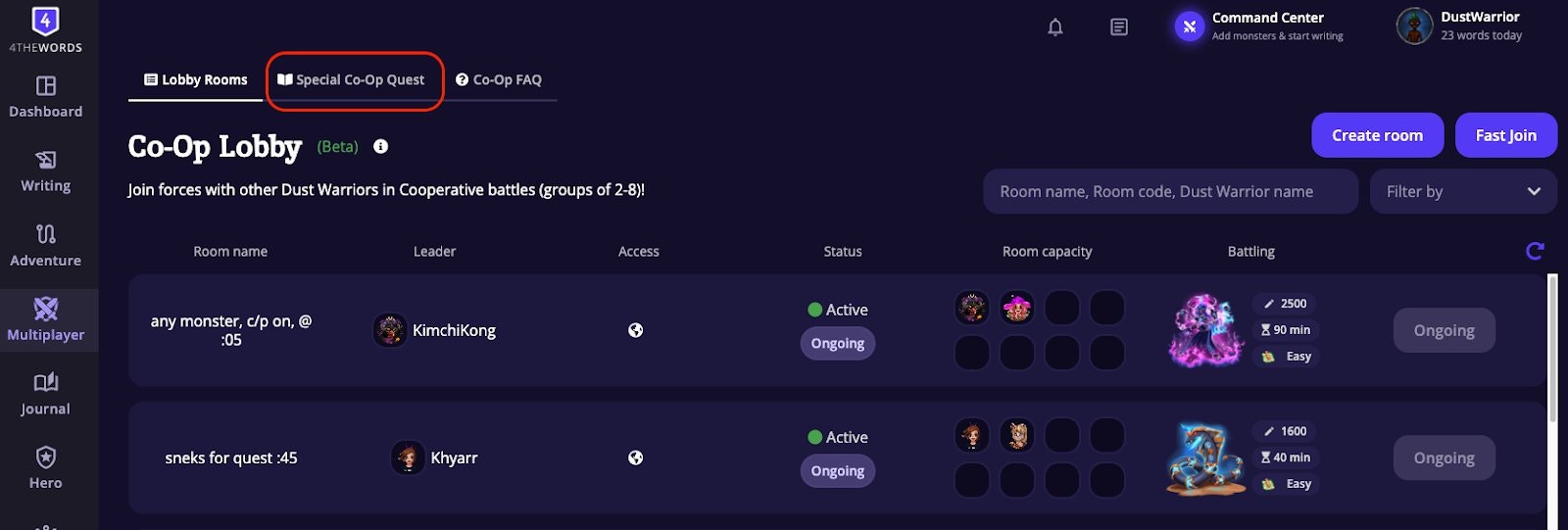
For dedicated co-op monsters and challenges, check the **Special Co-Op Quest** tab in Multiplayer. These quests feature challenges designed specifically for team play and often have unique rewards.
## Rewards & Mastery
Everyone gets their own individual reward roll based on their [**Luck stat**](/character-and-gear/items-and-spells/battle-items-and-stats), not based on how many words they wrote. Co-op battles count fully toward [Monster Mastery](/game-systems/mastery-system) just like solo battles do.
### Special Co-Op Quests
For dedicated co-op monsters and challenges, check the **Special Co-Op Quest** tab in Multiplayer. These quests feature challenges designed specifically for team play and often have unique rewards.
 ## Frequently Asked Questions
No. [Potions](/adventure/adventure-world/aurilis-magic-academy#potions) (Freeze, Slow Hex, Fire Grenade, etc.) are disabled in multiplayer battles. They only work in solo battles.
No, active solo battles will be frozen while you're in co-op. Once the co-op battle ends, you can unfreeze your solo battle and continue with your previous progress intact.
Leadership transfers automatically to one of the remaining players. The battle continues without interruption.
The battle won't start until all players click Ready. If someone is taking a while, the leader can wait or remove them from the room.
No, once a battle has started, new players can't join. You can wait in the lobby for the next one, or create your own room.
Once you leave a co-op battle, you may not be able to rejoin. Treat co-op sessions as a live commitment. Make sure you can stay for the full battle before clicking Ready.
Your damage contribution shows up on screen, but it doesn't affect your rewards. Everyone receives the same reward payout, determined by the battle's difficulty level, not by individual word counts.
Some account tiers have a limit on how many battles you fight per day. Check your account limits on the Account → Subscription page.
Make sure you've shared the exact room code (visible in the battle room header). If the room is private, they'll need to enter the code manually.
All current public rooms are either full or in progress. Try browsing the full lobby list, or create your own room and invite friends.
Our [Discord](https://discord.gg/gcmevdRfdd) has a dedicated Co-Op channel with Dust Warriors from all timezones hosting or looking for groups.
**Write together, fight together**
Prefer to go it alone? Solo battles let you fight at your own pace.
Find co-op partners, send messages, and coordinate your next team battle.
Meet other Dust Warriors looking for writing sprints and co-op rooms.
## Frequently Asked Questions
No. [Potions](/adventure/adventure-world/aurilis-magic-academy#potions) (Freeze, Slow Hex, Fire Grenade, etc.) are disabled in multiplayer battles. They only work in solo battles.
No, active solo battles will be frozen while you're in co-op. Once the co-op battle ends, you can unfreeze your solo battle and continue with your previous progress intact.
Leadership transfers automatically to one of the remaining players. The battle continues without interruption.
The battle won't start until all players click Ready. If someone is taking a while, the leader can wait or remove them from the room.
No, once a battle has started, new players can't join. You can wait in the lobby for the next one, or create your own room.
Once you leave a co-op battle, you may not be able to rejoin. Treat co-op sessions as a live commitment. Make sure you can stay for the full battle before clicking Ready.
Your damage contribution shows up on screen, but it doesn't affect your rewards. Everyone receives the same reward payout, determined by the battle's difficulty level, not by individual word counts.
Some account tiers have a limit on how many battles you fight per day. Check your account limits on the Account → Subscription page.
Make sure you've shared the exact room code (visible in the battle room header). If the room is private, they'll need to enter the code manually.
All current public rooms are either full or in progress. Try browsing the full lobby list, or create your own room and invite friends.
Our [Discord](https://discord.gg/gcmevdRfdd) has a dedicated Co-Op channel with Dust Warriors from all timezones hosting or looking for groups.
**Write together, fight together**
Prefer to go it alone? Solo battles let you fight at your own pace.
Find co-op partners, send messages, and coordinate your next team battle.
Meet other Dust Warriors looking for writing sprints and co-op rooms.