> ## Documentation Index
> Fetch the complete documentation index at: https://help.4thewords.com/llms.txt
> Use this file to discover all available pages before exploring further.
# Solo Battles
> Defeat monsters by writing words before time runs out. Your Attack stat makes every word hit harder.
Solo Battles are the most common way to fight in 4thewords. Pick a monster, open a document, and write. Your words deal damage. Beat the monster's word goal before the timer runs out and you win!
> **Where to find it:** Left sidebar → **Adventure** → [**Monsters**](/adventure/adventure-world/monsters) tab [Open in 4TW ↗](https://app.4thewords.com/adventure/monsters)
You'll find monsters waiting for you in your adventure areas and quest objectives. Each monster has a word goal, that's how many words you need to write to defeat it, and a time limit to write them in.
Any [document](/writing/documents-and-editor/files) counts. You don't have to write in a special battle screen, just open your editor and go. Your words deal damage during the battle.
**What counts as a word:** Any string of characters preceded and followed by a space. Punctuation attached to a word counts as part of it.
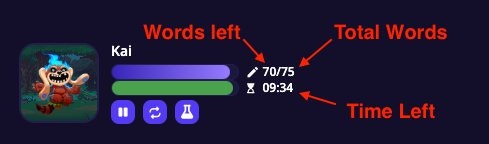 During a battle, the HUD shows your monster's portrait, two progress bars (words and time), and your current word count out of the total needed. The action buttons let you pause a next fight, loop, or use [potions](/adventure/adventure-world/aurilis-magic-academy#potions).
Your hero's [Attack stat](/character-and-gear/items-and-spells/battle-items-and-stats) acts like a multiplier. If your Attack is at 50, every 100 words you write counts as \~150 damage. Build up your Attack stat to hit harder with the same amount of writing!
When the monster's health reaches zero, you win. If time runs out before that happens, you lose the battle, but you keep all the words you wrote.
Win a battle and you'll earn items, Coins, and other rewards based on the monster you defeated.
## Finding Monsters
Two ways to browse and add monsters:
### Adventure → Monsters tab
> **Where to find it:** Left sidebar → **Adventure** → [**Monsters**](/adventure/adventure-world/monsters) tab [Open in 4TW ↗](https://app.4thewords.com/adventure/monsters)
The full monster browser. Shows every monster available to you with filters for size, type, area, favorites, and quest objectives. Best for browsing or when you know what you're looking for.
Complete Quests to gain access to more monsters & advanced areas. There are over 800 monsters to discover and push your writing to new heights.
### Command Center → Monsters tab
> **Where to find it:** Navigation bar at the top of any page → **Command Center** icon → **Monsters** tab
During a battle, the HUD shows your monster's portrait, two progress bars (words and time), and your current word count out of the total needed. The action buttons let you pause a next fight, loop, or use [potions](/adventure/adventure-world/aurilis-magic-academy#potions).
Your hero's [Attack stat](/character-and-gear/items-and-spells/battle-items-and-stats) acts like a multiplier. If your Attack is at 50, every 100 words you write counts as \~150 damage. Build up your Attack stat to hit harder with the same amount of writing!
When the monster's health reaches zero, you win. If time runs out before that happens, you lose the battle, but you keep all the words you wrote.
Win a battle and you'll earn items, Coins, and other rewards based on the monster you defeated.
## Finding Monsters
Two ways to browse and add monsters:
### Adventure → Monsters tab
> **Where to find it:** Left sidebar → **Adventure** → [**Monsters**](/adventure/adventure-world/monsters) tab [Open in 4TW ↗](https://app.4thewords.com/adventure/monsters)
The full monster browser. Shows every monster available to you with filters for size, type, area, favorites, and quest objectives. Best for browsing or when you know what you're looking for.
Complete Quests to gain access to more monsters & advanced areas. There are over 800 monsters to discover and push your writing to new heights.
### Command Center → Monsters tab
> **Where to find it:** Navigation bar at the top of any page → **Command Center** icon → **Monsters** tab
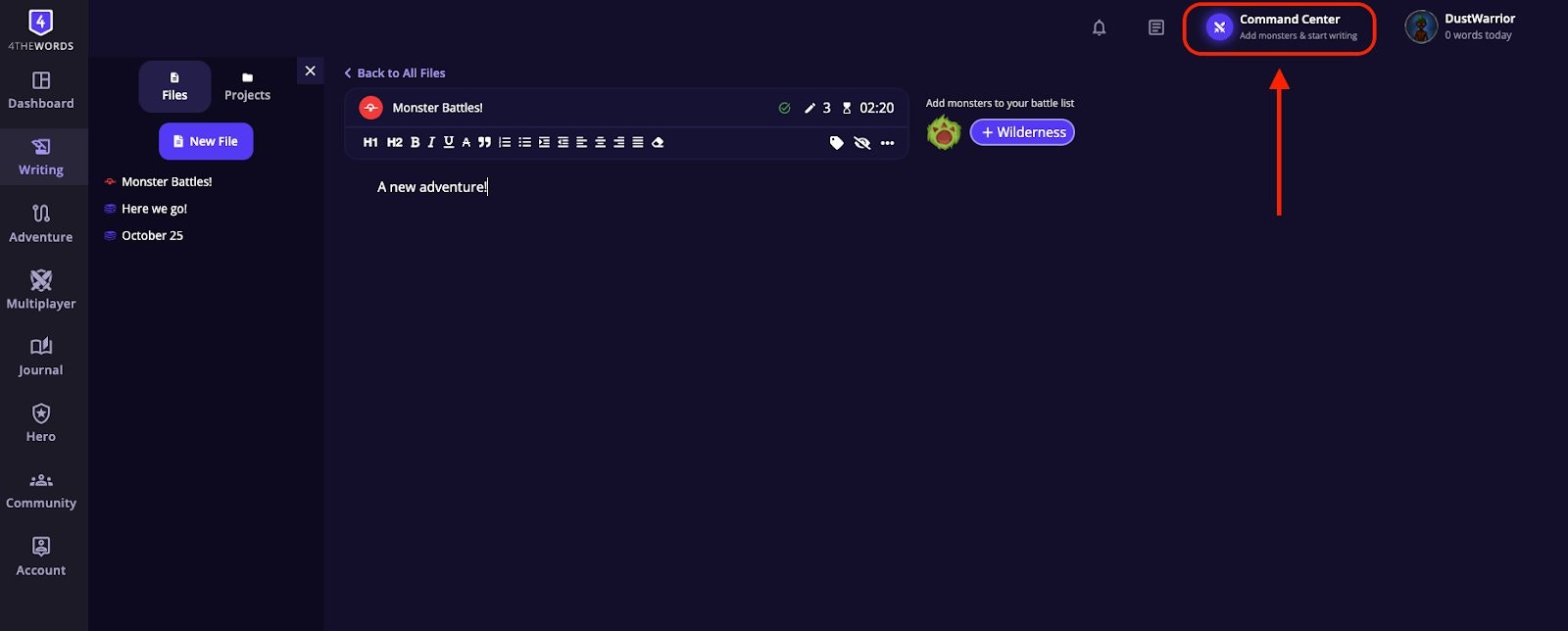 The Command Center is accessible from anywhere on the site, including the writing editor, without navigating away. Click it to expand the panel, then select the **Monsters** tab. The Command Center also has a **Daily** tab where you can track your [Daily Challenges](/writing/daily-challenges) progress and earn rewards for words written and battles fought each day.
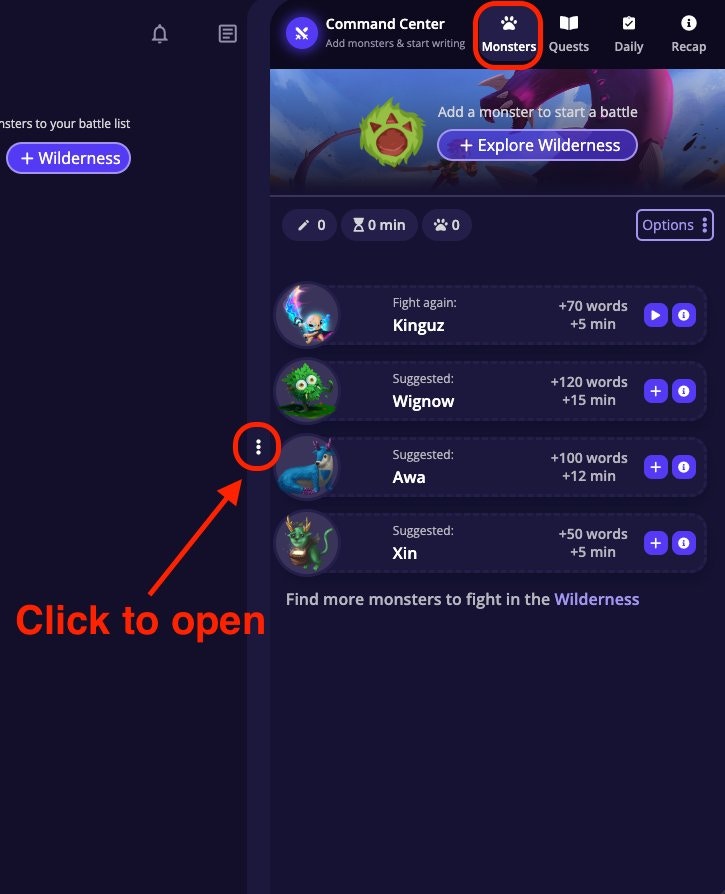 The Monsters tab shows four quick-access categories:
| Category | What it shows |
| -------------- | -------------------------------------------------- |
| **For Quests** | Monsters you need to defeat for your active quests |
| **Wilderness** | Monsters available in your current adventure area |
| **Recent** | Monsters you've fought recently |
| **Random** | A random selection of available monsters |
Click on the "+" on any monster in the Command Center to add it directly to your [Battle List](/writing/writing-battles/battle-list).
Use "For Quests" when you want to efficiently knock out quest objectives. It shows only the monsters you actually need.
## Monster Drops
Every monster has a unique set of items it can drop when you defeat it. Drops are added automatically to your inventory at the end of the battle.
* **Not every item drops every time.** Items have rarity levels. Some drop reliably, others rarely. Your [**Luck stat**](/character-and-gear/items-and-spells/battle-items-and-stats) directly improves your drop chances: the higher your Luck, the more likely rare items are to appear.
* **Some drops come in quantities.** When a drop has a range (e.g. 1–5), you'll receive a number within that range.
* **Finding which monsters drop an item:** Hover over any item image in the game to bring up its info window. The info window shows which monsters drop it and which markets sell it.
The Monsters tab shows four quick-access categories:
| Category | What it shows |
| -------------- | -------------------------------------------------- |
| **For Quests** | Monsters you need to defeat for your active quests |
| **Wilderness** | Monsters available in your current adventure area |
| **Recent** | Monsters you've fought recently |
| **Random** | A random selection of available monsters |
Click on the "+" on any monster in the Command Center to add it directly to your [Battle List](/writing/writing-battles/battle-list).
Use "For Quests" when you want to efficiently knock out quest objectives. It shows only the monsters you actually need.
## Monster Drops
Every monster has a unique set of items it can drop when you defeat it. Drops are added automatically to your inventory at the end of the battle.
* **Not every item drops every time.** Items have rarity levels. Some drop reliably, others rarely. Your [**Luck stat**](/character-and-gear/items-and-spells/battle-items-and-stats) directly improves your drop chances: the higher your Luck, the more likely rare items are to appear.
* **Some drops come in quantities.** When a drop has a range (e.g. 1–5), you'll receive a number within that range.
* **Finding which monsters drop an item:** Hover over any item image in the game to bring up its info window. The info window shows which monsters drop it and which markets sell it.
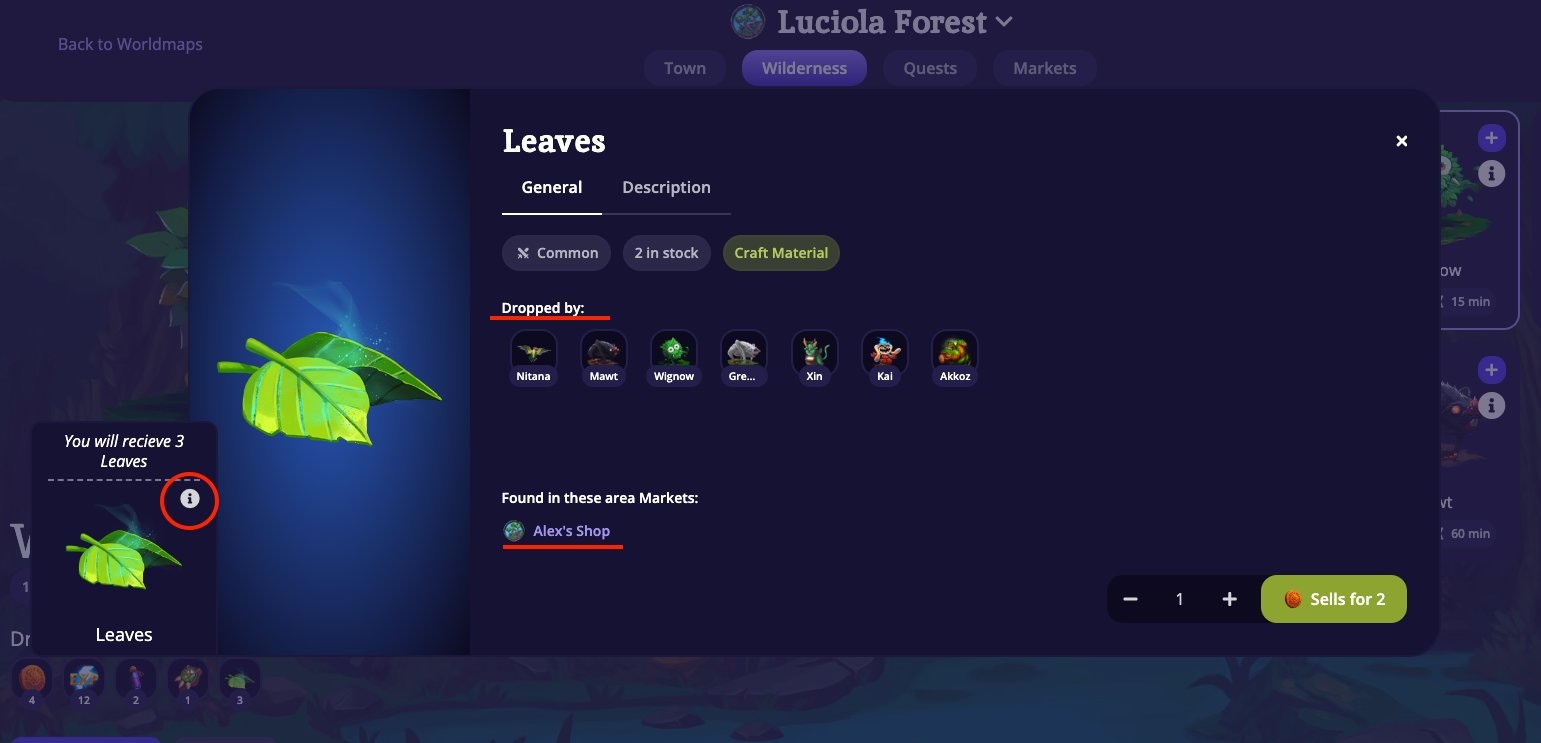 Click the **"i"** icon on any monster card to open its full info window, which lists all its possible drops, their quantities, and their rarity.
## Frequently Asked Questions
No, write in any document in your writing area. Words you type during an active battle automatically count toward it. You don't need to do anything special and can switch between documents.
The timer ran out. You keep all the words you wrote and can try again with a boosted Attack stat or a smaller monster.
Make sure the battle is actually active (not frozen or on hold). If you entered a co-op room, your solo battles pause automatically. Check your battle status after returning from co-op.
No. Write whatever you want. Your word count is what deals damage, not the topic.
Only with a [Freeze Potion](/adventure/adventure-world/aurilis-magic-academy#potions). Once a monster battle begins it can't be stopped unless you Freeze that battle with a Potion.
**Keep fighting**
Try a different kind of fight. Survive the monster's attacks instead of dealing damage.
Queue up monsters, chain battles, and build your perfect writing session.
Browse 800+ monsters and find the right challenge for your next session.
Click the **"i"** icon on any monster card to open its full info window, which lists all its possible drops, their quantities, and their rarity.
## Frequently Asked Questions
No, write in any document in your writing area. Words you type during an active battle automatically count toward it. You don't need to do anything special and can switch between documents.
The timer ran out. You keep all the words you wrote and can try again with a boosted Attack stat or a smaller monster.
Make sure the battle is actually active (not frozen or on hold). If you entered a co-op room, your solo battles pause automatically. Check your battle status after returning from co-op.
No. Write whatever you want. Your word count is what deals damage, not the topic.
Only with a [Freeze Potion](/adventure/adventure-world/aurilis-magic-academy#potions). Once a monster battle begins it can't be stopped unless you Freeze that battle with a Potion.
**Keep fighting**
Try a different kind of fight. Survive the monster's attacks instead of dealing damage.
Queue up monsters, chain battles, and build your perfect writing session.
Browse 800+ monsters and find the right challenge for your next session.