

Overview
Your account settings control your display name, timezone, notifications, and login credentials. Getting your timezone right is critical: the game calculates your writing streak based on your local midnight, so a wrong timezone can cause streak breaks even when you’ve written.Where to find it: Left sidebar → Account → Settings (or Profile) Open in 4TW ↗
Key Settings
Timezone
We set it automatically, but check this first. Your timezone determines when your writing day starts and ends. If your timezone is wrong, days may reset at the wrong time, causing missed streak days even when you’ve written.- Go to Account → Settings.
- Find the Timezone field.
- Select your current timezone from the dropdown.
- Save.
If you travel or move, update your timezone so streak calculations stay accurate.
Display Name & Profile
Your display name is how other Dust Warriors see you across the game, in the community, in Lookbook, and on your public profile.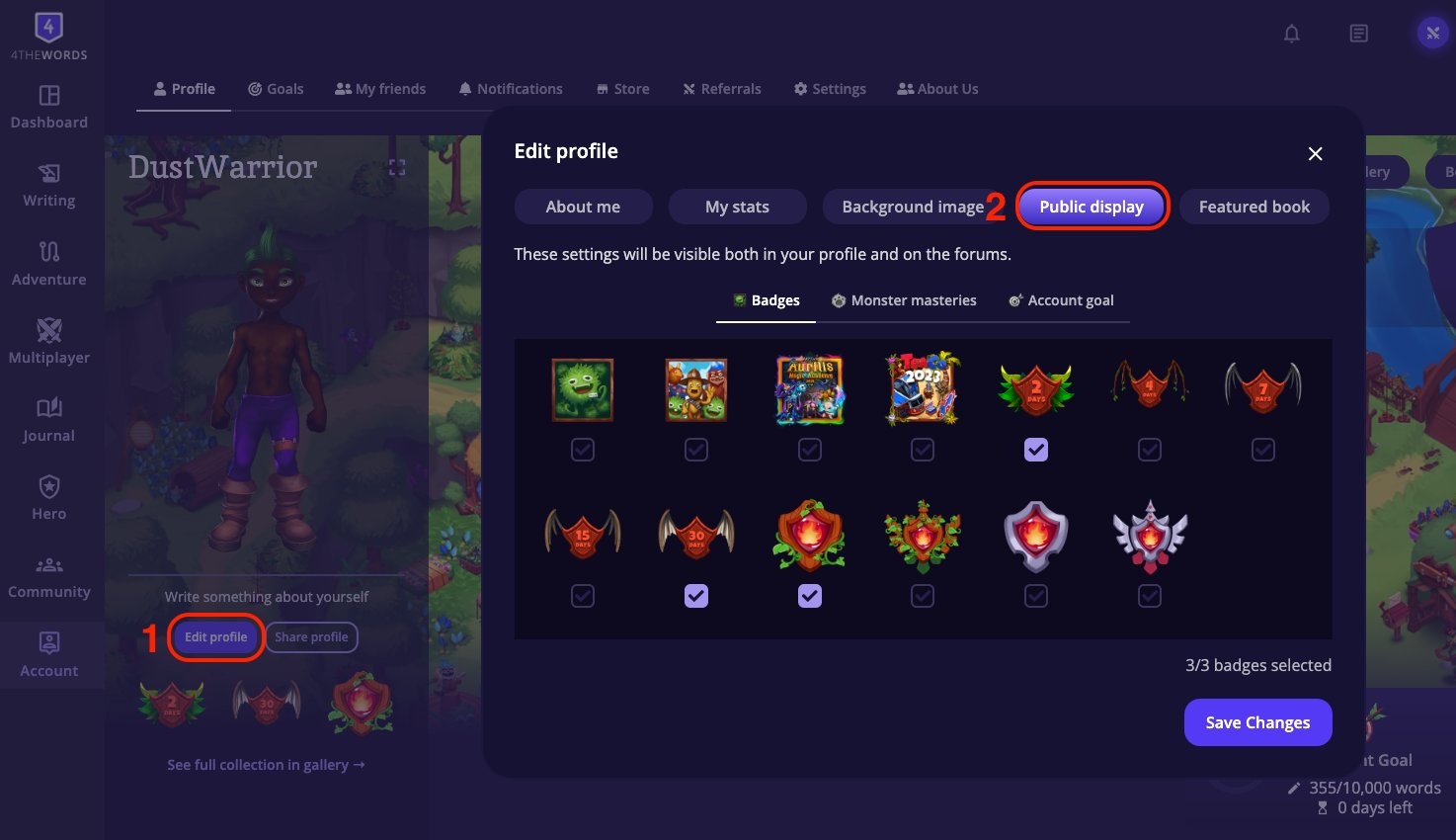
- Display name. Change it from Account → Settings → Profile.
- Public profile. Shows your featured character, mastery badges, and any public wardrobe looks.
- Public Display. Use Edit Profile → Public Display to choose which badges, masteries, and goals appear on your profile and in forums. You can feature up to three badges, so this is where a Mentor Journey badge goes if you want it beside your hero’s name.
Email & Password
Update your login credentials from Account → Settings:- Change email: enter your new email address and confirm.
- Change password: enter your current password, then your new one.
Invited by a friend?
A card in your settings handles your referral connection. If a friend invited you, it names your mentor and gives you a Say thanks button. If nobody invited you yet, it’s where you enter a referral code. You can only enter a code within 7 days of creating your account, and only before you subscribe. See You Were Referred for what you and your mentor both earn.Frequently Asked Questions
How do I know if my timezone is correct?
How do I know if my timezone is correct?
Check it in your settings. Also, your writing streak resets at local midnight. If streak days seem to reset earlier or later than midnight in your location, your timezone is likely set wrong. Go to Account → Settings and update it.
Can I change my username?
Can I change my username?
Username change availability may vary. Check Account → Settings for the option. If it’s not available, contact support.
How do I delete my account?
How do I delete my account?
Account → Settings → Delete account
My account settings (timezone, display name, email, or character appearance) aren't saving.
My account settings (timezone, display name, email, or character appearance) aren't saving.
Click Save after every change. Settings don’t auto-save. If a change reverts after reload, try a hard refresh (Ctrl+Shift+R / Cmd+Shift+R) or a different browser.
Writing Streaks
Keep your consecutive streak alive, earn Wings and Medals, and repair missed days with Stempos.
Referrals
Invite friends, become their mentor, and earn rewards together as they write.