Overview
Special Events bring new, limited-time content to 4thewords. They’re a chance to pause your regular progress and experience something that exists only for a short window. New monsters, quests, areas, items, and story beats that arrive together and vanish when time runs out. 4thewords runs more than 6 special events per year, each with a different theme, size, and length. Some are small weekend celebrations; others are multi-week campaigns. Recurring events (like Love Festival every February) always introduce content that’s new to everyone, even returning players.2026 Event Calendar
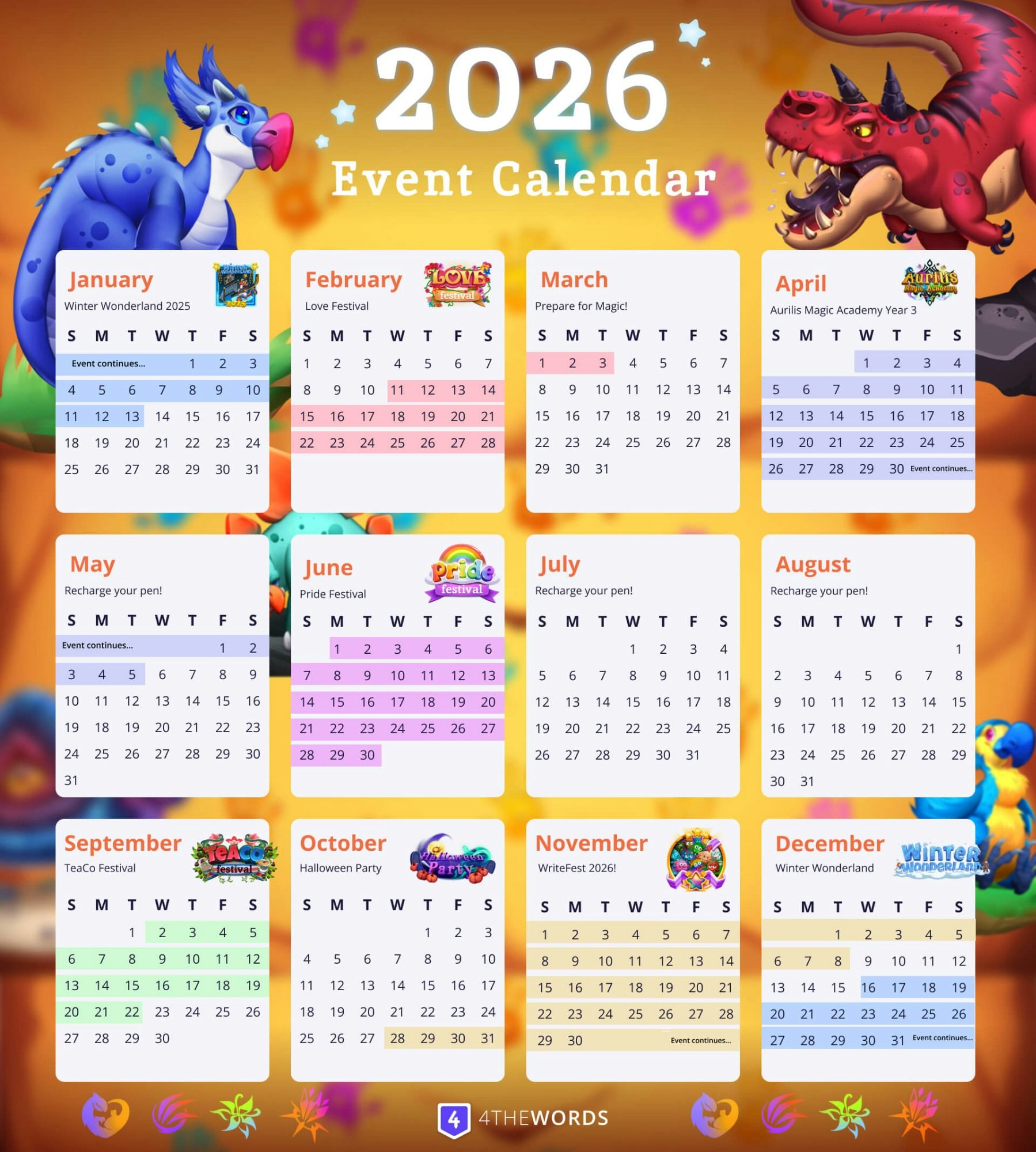
Where to find the live calendar: Left sidebar → Community → Pages → Special Events Calendar
How It Works

When Events Start and End
Every special event has an announced start time and end time. Content is unlocked for everyone at the start time and becomes unavailable at the end. When an event is active:- New areas appear on the world map
- New monsters, quests, and market items become available
- A global objective may be visible, a community-wide target all players contribute to
- Event-exclusive rewards including items, wardrobe pieces, and collectibles
- Event areas disappear from the world map
- Event-specific monsters and quests are no longer accessible
- Any content you’ve earned stays in your inventory permanently
Tokens
Most events introduce a Token, an event-specific currency you earn by completing battles and quests during the event. Tokens are used to purchase exclusive event items from the event market before the event closes. Pro and Lifetime Pro subscribers receive 100 bonus Tokens automatically on the first day of every event. Most event monsters drop 1 Token for about every ~50 words.Pro vs. Non-Pro Access
All subscription tiers (including Free) can participate in special events. Pro and Lifetime Pro members get additional advantages:
The 5-day extension means Pro players can continue earning and spending Tokens after the event closes for everyone else, a significant advantage for finishing event quest chains.
Global Objectives
Some events feature a global objective, a community-wide target visible to all players. Everyone who participates contributes simultaneously: battles won, quests completed, and words written may count toward the shared goal. When the community hits the target, a reward is unlocked for all participants.Revisiting Past Events: Shrine of Ages
Missed an event? The Shrine of Ages is a special Expedition Area that lets you permanently unlock and revisit past events using Shrine Tickets and Bracelets. Events you unlock at the Shrine are yours forever. No time pressure, no expiration.Frequently Asked Questions
What happens to my Tokens when an event ends?
What happens to my Tokens when an event ends?
Unspent Tokens from a specific event are typically no longer usable after the event window closes. Sell them for Coins.
What if I miss an event entirely?
What if I miss an event entirely?
Some past events can be revisited through the Shrine of Ages using Shrine Tickets. Not every past event is available there, but it’s the main path to past-event content.
How do I know when the next event starts?
How do I know when the next event starts?
Check the Special Events Calendar (Community → Pages → Special Events Calendar) for the full year’s schedule. A site header countdown also appears when an event is approaching or active.
Do yearly recurring events have the same content each time?
Do yearly recurring events have the same content each time?
No. Even recurring events (like Love Festival) always include new content. You won’t be replaying the exact same items and quests from a previous year.
I can't find the event area on the world map.
I can't find the event area on the world map.
Event areas only appear while the event is active. Check the site header for a countdown: if there’s no countdown, the event hasn’t started yet or has already ended. If the event is active and you still can’t see the area, try refreshing the page.
I didn't receive my 100 Pro bonus Tokens at the start of the event.
I didn't receive my 100 Pro bonus Tokens at the start of the event.
Visit the event’s Token Store to pick up your 100 Bonus Tokens & exclusive Pro Item.
If I upgrade or downgrade my plan mid-event, what happens?
If I upgrade or downgrade my plan mid-event, what happens?
Upgrading to Pro mid-event grants you bonus Tokens, the premium item, and extra days immediately (early access can’t be applied retroactively since the event already started). Downgrading to Free mid-event drops you to limited access for the remainder of the event.
The event ended and I still have unspent Tokens.
The event ended and I still have unspent Tokens.
If you’re a Pro subscriber, check whether your 5-day extension is still active. The event market may still be accessible for you. After your extension ends its best to sell your Tokens for Coins.
Plans & Pricing
Pro event perks including early access, bonus Tokens, and the 5-day extension.
Shrine of Ages
Permanently unlock and revisit past events using Shrine Tickets and Bracelets.
Resources & Currency
How Tokens and other event currencies work.