

Overview
Quests are objectives you pick up and complete for rewards. Completing quests unlocks new areas, earns rare items and wardrobe pieces, and advances the story. Two quest tracks: the Main Storyline, your guided path through the game and the key to unlocking new areas; and Sidequests, which you pick up freely from Quest Markets and complete at your own pace.How It Works
The Main Storyline
The Main Storyline is the backbone of your adventure, how you unlock new areas, meet the world’s characters, and move forward. If you ever feel stuck, your Main Storyline is the first place to check.Where to find it: Left sidebar → Journal → Questbook → Main Storyline tab Open in 4TW ↗
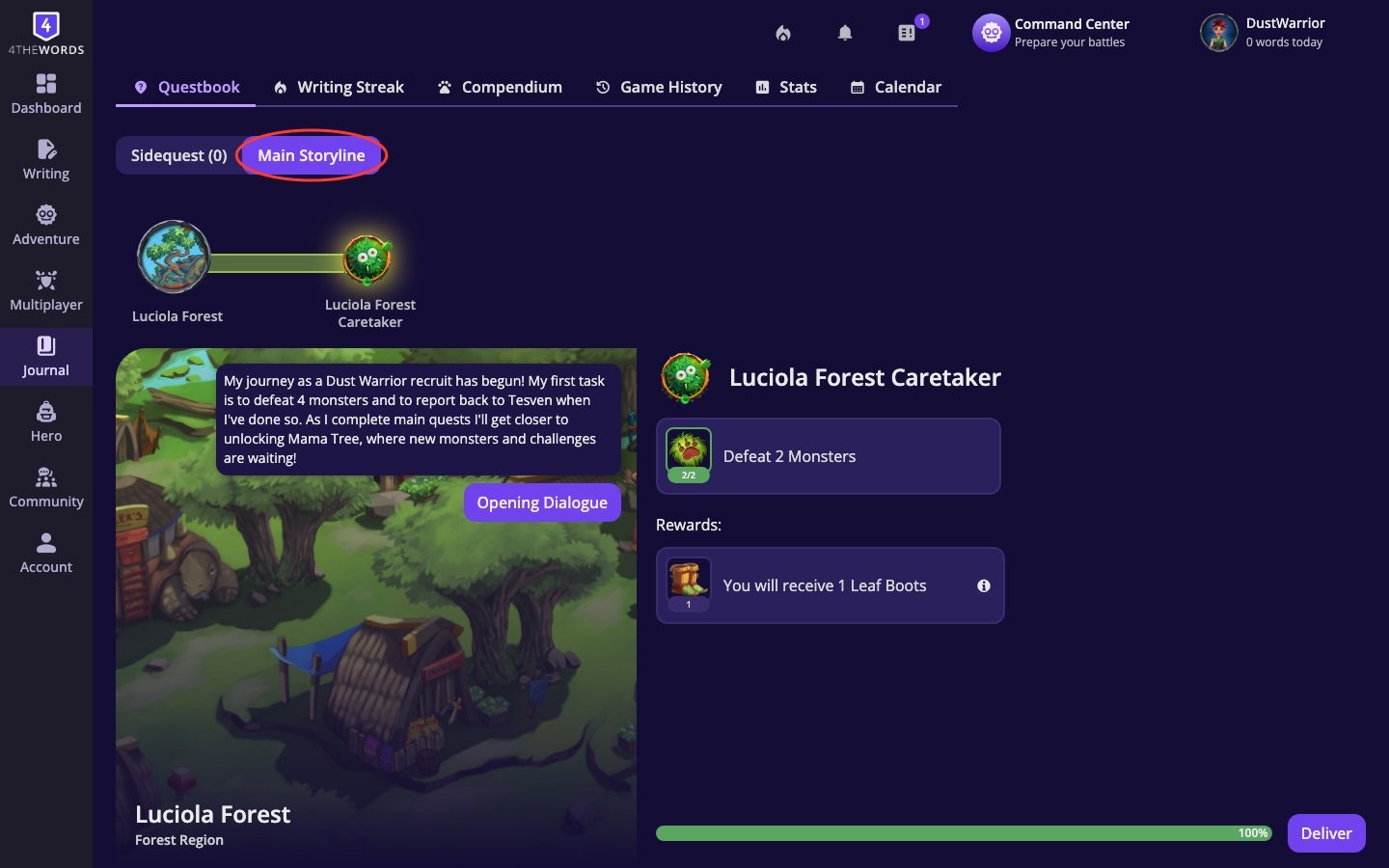
- Open your Main Storyline. You’ll see a visual timeline showing every area you’ve unlocked in the story. Completed chapters show a checkmark; future ones show a lock until you reach them.
- Work on your current main quest. You can only have one main quest active at a time. Tap it to see the objectives panel. This shows every requirement and your current progress toward each one.
- Complete all objectives, then deliver. Once every objective reaches 100%, the Deliver Quest button appears. Tap it to claim your rewards and unlock the next chapter of the story.
Main Storyline quests cannot be dropped. They’re always waiting for you when you’re ready to continue.
Finding Sidequests
Sidequests are optional adventures you pick up from Quest Markets. Special shops found in each adventure area. Different areas have different quests, and new ones unlock as you explore more of the world.Where to find it: Left sidebar → Adventure → Quests tab Open in 4TW ↗
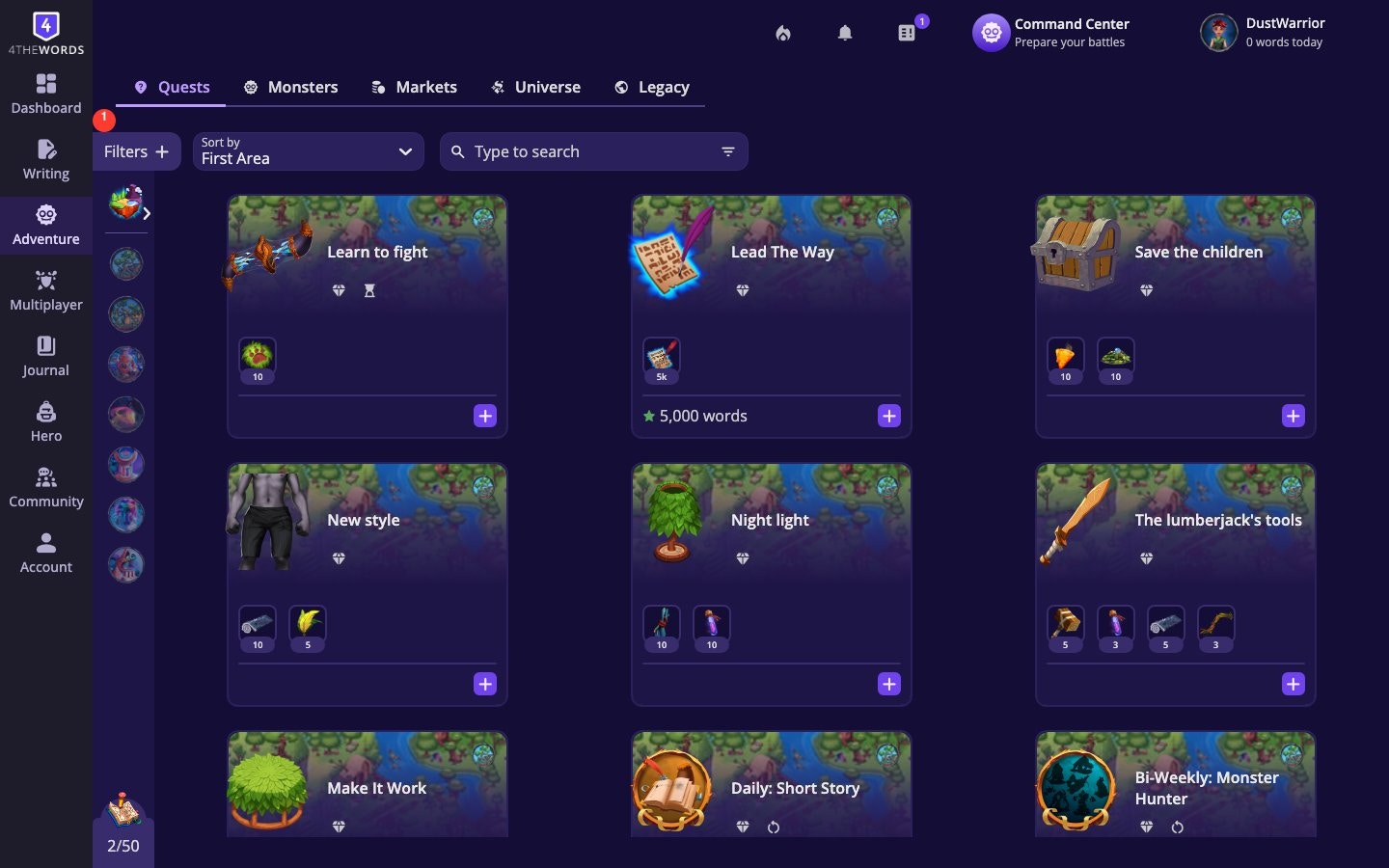
- Browse the Quest Market. You’ll see all available quests listed with their area, estimated wordcount, and rewards. Use the filters to narrow down by wordcount range, objective type, reward type, or special flags like timed or repeatable.
- Open a quest to read its details. Each quest shows its full description, objectives, and rewards before you commit to it.
- Accept the quest. Tap Accept Quest to add it to your Questbook. If the quest involves fighting a monster, you’ll also see Accept + add Monsters. This accepts the quest and queues up the required monsters into your Battle List at the same time.
Filtering Quests
The Filters button lets you find exactly what you need:- Filter by wordcount: Find quests that fit your writing session (1k, 10k, 25k, 50k, 100k+)
- Filter by objectives: Defeat Monsters, Items, Wordcount, Forum Activity, and more
- Filter by rewards: Items, Wardrobe, Hideout elements, Area (unlocks new regions), Companions, Badges
- Favorites: Show only your starred quests
- Repeatable / Timed toggles. Show only quests you can redo, or only time-limited ones
Looking for how to manage your active quests? Delivering, tracking objectives, timed quests, repeatable quests, and dropping quests are all covered in the Questbook guide.
Frequently Asked Questions
How do I unlock new areas?
How do I unlock new areas?
Follow the Main Storyline. Completing main quests is the primary way to open up new parts of the world.
Where do I find new quests?
Where do I find new quests?
Go to Adventure → Quests to browse Quest Markets from all areas. You can also find quests from merchants in area bazaars.
I can't find a Quest Market in an area.
I can't find a Quest Market in an area.
The area may still be locked. Quest Markets become available as you unlock areas through the Main Storyline. Check your Main Storyline tab to see what’s needed to open the next area.
Questbook
Manage your active quests, deliver for rewards, and handle timed and repeatable quests.
Game World For Writers
Explore the interactive world map, unlock new regions, and discover the 4thewords universe.